
Tag Archives: QuickBooks

accounting software design vector chart with bar chart line chart financial diagram analysis designs can be used for template 202524904

Best Accounting Apps for Small Businesses

With such a wide range of applications to choose from, choosing the right ones can be overwhelming and difficult, especially when finding the best accounting tool for your business. Bookkeeping is an integral part of your business to help remain profitable. Fortunately, apps always make it easy to keep track and organize your data. Here is a list of the eight best accounting apps for your business.  

You can use a mobile accounting app to keep track of your business funds no matter how far you are from the office. So if you want to do bookkeeping on the go, we recommend checking out these providers.  The QuickBooks Online program is our top choice, but you’ll find plenty of other things to love about that we have reviewed here. 

  1. QuickBooks Online – Best Overall

The QuickBooks program performs everything your QuickBooks Online account does. That’s quite a bit of work, since many companies’ applications don’t consider the weight of their desktop versions. The following: 

  • Get 50+ popular, easy-to-read financial reports and send them to other parties.
  • Send invoices with receipts attached through SMS, email or messaging app, with the added security of an encrypted link. 
  • Automatic expense tracking. 
  • Use GPS to track mileage. 
  • Create, accept, and sign offers for customers even when you are away from the office.
  • Accept payments through your preferred payment gateway
  • Transfer payments to your bank automatically. 
  1. FreshBooks Our Second Choice

FreshBooks is an easy-to-use accounting software solution that simplifies the accounting process for your company. With features such as time tracking and account and cost tracking, you can easily control your costs.
Are you a Freelancer who needs to monitor project time, juggle costs, and send exact invoices to clients on the go? We cannot recommend the cloud-based accounting software FreshBooks enough for situations where you need this help the most. For $15 a month, FreshBooks allows customizable invoices without limitations. You can bill your customers the proper amount for each job using the platform’s time tracking capabilities to accurately record data.

FreshBooks also includes estimates that you can compile in the app to convert the customer approval and then to start billing after the project has been completed into an invoice. The app works well for Apple users as it does for Google users, and while it has fewer users than QuickBooks, it does very well for both platforms. 

Plus, the FreshBooks customer service team is very active on both review sites. If you have a problem, a customer service representative will usually handle your complaint in a matter of hours. The rep will pass on the request to a developer who will offer direct help for your needs. 

Other Apps of Value

  1. GoSimpleBooks 

With GoSimpleBooks, you can concentrate on the most important aspects of your business so that you don’t waste time on tasks that take a while. With simple and automatic interface capabilities, GoSimpleBooks does a lot for small business accounts easier for accountants who manage the finances of small businesses and sole proprietorships.

  1. Sage One 

Sage One performs and automates basic technical accounting chores to save you time. This application lets you create and send invoices from your phone, keep track of expenses, and see your entire business at a glance on your dashboard. 

  1. Sellsy Invoicing 

Sellsy Invoicing is a great app for small business owners and freelancers. It helps you send invoices, manage your products and services, and send payment reminders. It also has contact features that let you chat with the rest of your team, submit tasks, and keep a schedule. 

  1. Nutcache

This accounting app is inexpensive and ideal for small businesses. In addition to the expected accounting functions, Nutcache integrates with your favorite tools and even helps with project budgeting to avoid excess costs. It also offers billing, time tracking, and multilingual support.

  1. FreeAgent

FreeAgent helps you create invoices for customers and manage your expenses and bank accounts. This cloud-based accounting software ensures you don’t have to worry about lost information. It also offers automated bank feeds, time reports, and multi-currency billing to help small businesses with their accounting needs. 

FreeAgent has all of the basics of a good accounting software program, including receipt capture, billing, and on-site billing. It also has some key advantages. For one, it lists your upcoming tax dates so you can plan for them. It also has a timing function that allows you to keep track of meetings and manage mileage. 

Since FreeAgent is a UK-based company, all of its support team works in the UK. But that doesn’t stop the agents from getting in touch with you: The support team for the FreeAgent app answers virtually all comments (positive and negative) from both the App Store and the Google Play Store, thanking users and actively asks users to participate. 

  1. Hiveage: Best for Payments 

We know the Hiveage app has low user traffic, but given the company is only five years old (one of the youngest on our list), that’s to be expected. And if you need a quick and fitting way to top up, we highly suggest Hiveage to consumers. 

The software and app support more than twelve payment gateways, including Square and PayPal, plus more specific options like 2Checkout. Hiveage’s plans also allow you to make offline payments, and plans come with customers, invoices and cost estimates. The Hiveage app does everything the software does, which is excellent if you need the same functions on the go as you would on the desktop. And if you love the word unlimited but not the monthly fee, Hiveage’s new free plan only limits your monthly billable customers. Otherwise, you get unlimited billing, expense tracking, time tracking, estimates, and the free app.
Clover Point of Sale Trends for 2021

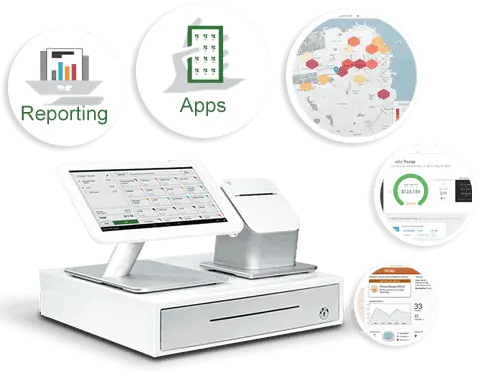
The Clover® point-of-sale or POS system is one of the most popular choices you can utilize in your business today. With Clover, you can create a fully integrated POS system that supports many apps and plug-ins. You can also handle online ordering services through Clover without paying anything extra. Clover also provides one of the most affordable services around, you could pay $70 a month at the most for a Clover station.

The best part of Clover is that it is constantly evolving. You’ll find many new things to do with your Clover POS setup as new programs and setups are developed. You can use some of these points right now when using Clover for your POS demands. These are some samples of what you can expect, as the industry is always changing with new ideas and plans in mind.

Individual Employee Monitoring

You might have many employees using the same Clover POS station, managing all your employees with separate logins, but Clover goes one step further with their performance tracker programs.

The performance tracker system lets you review each worker surrounding how many transactions one manages, how much these deals are worth, and anything else someone might achieve. You can use this to see which employees are doing well and which ones need further improvement.

Further Payroll Support

Performance tracking is essential, but so is keeping the payroll under control. You’ll need to know when your employees punch in and out, how much they are earning, and many other factors surrounding how they work. Clover will evolve to offer more payroll support, especially with the use of apps like Time Clock.

The Time Clock app from Homebase allows businesses to keep tabs on when employees are working. It also offers an employee scheduling platform where you can keep records on future schedules and send them to your employees. You can also include details on schedule changes, job postings, open shifts, and other factors. Time Clock lets you send these details to all your employees, ensuring everyone is on the same page when handling your data.

Managing Bar Tabs

Bar tabs are becoming more common these days, as people are looking to make it easier for them to pay for what they order at restaurants and bars. Clover will expand its offerings to enhance how well it can handle bar tabs.

The Bar Tab Auths app is one choice to note, for example. Bar Tab Auths let businesses pre authorize credit cards on new bar tabs. It reduces the repetitive nature of the work, and it also keeps records on regular customers and payment methods. The system ensures all data being collected works well and is easy to monitor and read.

Flexible Platforms

Clover offers a convenient station setup that lets you collect money with ease. You can use a Clover station with a touchscreen monitor, a credit card processor, a printer, and other accessories. But you can also expect mobile Clover platforms to become more popular as time moves forward.

Separate mobile payment systems may be available for your needs. You can load a Clover setup on a mobile device like a tablet or smartphone. Clover is expected to add support for multiple items in the future, so you can expect mobile transactions to become more prominent in the future.

The Clover Mini Provides More Control

Giving customers the ability to complete transactions themselves can be a necessity for success. The Clover Mini is one program that may work well for POS purposes. The Mini is a stationary countertop screen that links to a Wi-Fi network and collects payments from NFC or chip-based card readers. The system is easy to run, plus you can program a secure setup in the work as necessary. You’d have to use a suitable POS program that runs with an app from a marketplace to make it work, but it won’t be tough to run if you have the proper materials that are necessary.

Additional Integrations

You can also expect Clover to support more integrations. The Android-based setup Clover uses ensures you can load and program different add-ons and other integrations to your liking. You could use the Clover Station app store to review the thorough list of programs available for many industries. More integrations will be made available soon, so expect these programs to become more interesting and useful.

Working With QuickBooks

The QuickBooks accounting program from Intuit is already ideal for many businesses. But QuickBooks has been a standalone solution that takes a while to manage. You’d have to manually enter in data to your QuickBooks account to ensure everything is accurate. The program can collect a thorough amount of data, but it isn’t always easy to manage.

The good news is that QuickBooks will be easier to utilize if you have a Clover station. QuickBooks has a new app on Clover that was produced by Commerce Sync. The system integrates QuickBooks to your Clover POS station. The POS data will move directly to your QuickBooks account, saving you precious time managing your accounting needs. You’ll also ensure everything remains accurate, as all Clover data will immediately move to your QuickBooks reports without risking possible losses or errors.

Maintenance Is Critical

Consistent maintenance is essential for ensuring a Clover POS setup can work. Clover will expand its offerings to make it easier for people to order paper for any printers that attach to a Clover station. Abreeze Technology already has a new app ready for use in Order Paper that helps people find paper products for whatever Clover printers they utilize. For example, people can find the paper they need and order it as necessary, ensuring they’ll have the equipment they require for their work plans.

These points are useful when you’re looking to support your Clover POS setups and accounts. Clover will continue to evolve in 2021 and beyond, as it will provide more solutions that will make your POS efforts easier to manage. 

The Clover® name and logo are trademarks owned by Clover Network, Inc., an affiliate of First Data Merchant Services LLC, and registered or used in the U.S. and many foreign countries.