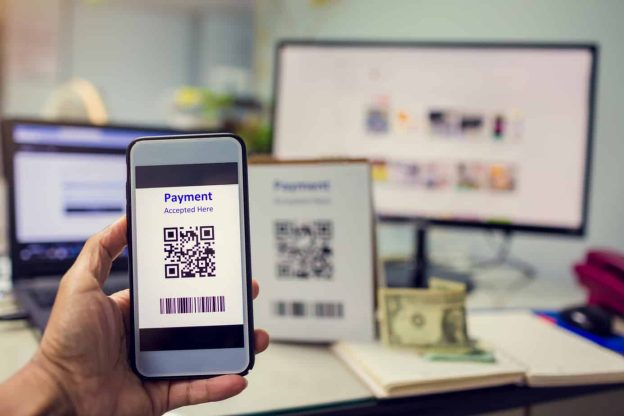
QR or the quick code has become a popular technology used extensively by many retailers around the world recently. Unlike the regular bar codes located on the commercial packaging, the QR code is a comprehensive code that can be scanned and decoded with smartphones. The best example of a company using QR codes for in-store payments is Starbucks.
It may look as simple as the black and white squares, but these codes have the capacity to store a large amount of information. They make an excellent option for connecting the offline and online world seamlessly. Customers can make payments through QR codes by scanning them using their smartphones, and the retailers can accept payments directly to their bank accounts or mobile wallets with these codes.
A Brief on its History
Denso Wave, a famous Japanese automobile manufacturing company, launched QR codes back in 1994. The main purpose of launching these codes was to deal with the limitations of barcodes.
The quick response code was designed to store infinite information within small white and black squares. These codes started gaining popularity in Japan in 2002 when the country launched smartphones with the ability to scan and read QR codes. Since then the popularity of QR codes has skyrocketed.
QR Code Advantages
A QR code is used as a marketing tool to attract more people to your business. It’s one of the ideal ways to turn your prospects into regular customers. Here are a few major benefits of using QR codes for your business.
- Good for Networking
As mentioned earlier, QR codes are not the regular barcodes printed on your company’s package. It is a marketing technique that can get your customers to your Facebook, Twitter, and LinkedIn pages. Bringing your audience to your social media means higher engagement and more attention. These people will spread the word about your brand to their social media friends.
- Call-to-Action
You can use QR codes to direct your audience to instructional posts, websites, landing pages, emails, and trailers. Businesses have started linking these codes to the email and call function where people are directed to your email page as soon as they scan the code. Some retailers allow their audience a huge discount if they scan the QR code.
- It is Versatile
Another advantage of QR codes is their versatility. You can use it for a wide variety of purposes ranging from social media marketing to online transactions. In addition to directing people to your landing pages and social platforms, a QR code can be used to make payments. You can integrate different payment methods into your QR code, thus allowing your audience to choose a convenient payment option.
- It Makes You Creative
Ideally, the QR code is the black and white squares that can be scanned in simple taps. However, it comes with infinite creative possibilities. You can make it look super interesting by using a personalized and colorful QR code, designed for your business. It’s a great way to make your brand stand out from your competitors and attract a wider audience.
- Your Customers Find Them Attractive
Customers like QR codes for a few reasons. For starters, they are easy to use. All your customers need is a simple scanning and they will be taken to your company’s landing page or email address. They no longer need to write the website address or remember the email.
Besides, only a few people remember to visit your website later. QR codes make your customers’ life a lot easier by allowing them to visit your website by scanning the code. If you make it easier for your audience to find the latest offers and connect with your brand, there is a good chance they will convert.
- It Helps You Go Digital
With QR codes, you can save time and money on traditional advertising campaigns. It is the ultimate way of going digital with your business. You no longer need to get posters, flyers, and other paper materials for your company’s publicity.
Instead, a QR code is all your customers need to find just about any type of information about your business – be it the latest product launch or your website’s landing page. It also saves you the cost of traditional marketing methods. Printing flyers and brochures can cost you hundreds of dollars. QR code, on the other hand, is a one-time investment.
Disadvantages of QR Codes
A QR code comes with a set of limitations for businesses and customers. Here are a few disadvantages of using QR codes.
- Not the Best Customer Experience
QR codes were designed to direct people to the company’s social media, landing page, and other informative content in a single snap. However, your audience needs to download a QR code reader in order to make it work. So, for those who are not comfortable with installing a new software app on their device, the QR code is not a viable option.
- You May Have to Offer a Better Reward to Your Audience
A QR code is useful for businesses that are willing to offer exciting rewards and promotional deals to their audience. So, just linking your social media or directing your users to your email may frustrate your customers, as this is the basic information. If you don’t have any special discount to offer, the QR codes might not work for you.
- It isn’t Accepted by all Customers
QR codes can get your business on a digital platform, but it is not embraced by customers looking for traditional marketing techniques. If your audience doesn’t know how to use the QR codes or they aren’t comfortable with it, they will never convert. So, it is better to stick to the conventional advertising methods than a QR code, which may confuse your target audience.
Bottom Line
These were the pros and cons of QR codes. While the technology works as a solid marketing tool to expand your reach to a wider audience worldwide, it comes with a few drawbacks.
 The versatility of the codes doesn’t stop there, a QR Code can also contain a phone number, an SMS message, a link to a photo, contact information or just plain alphanumeric text, and the scanning device will respond by opening up the correct application to handle the encoded data appropriately. With the technology of mobile phones constantly expanding, especially within mobile internet, QR Codes seem like the perfect solution to quickly and efficiently bring mobile phone users onto the mobile web.