Tag Archives: POS

marketing tips

Clever Marketing Tips to Improve Restaurant Sales

It’s not easy finding ways to improve your restaurant’s profit margins while managing food and labor costs. A business’ bottom line is the priority of the operation, but in a customer-facing business, going about it the wrong way can do more harm than good.

But that doesn’t mean there aren’t ways to improve your sales while maintaining a balance between customer satisfaction, costs, and profit margins. It’s all about implementing new strategies and techniques. By using the tips below, you can improve your restaurant sales significantly.

In this article, you’ll find a list of strategies you can adopt to help you improve your restaurant sales.

14 Marketing Tips to Help You Boost Restaurant Sales

From adopting new marketing channels to doing events in your restaurants and much more. Here is the list of marketing tricks that you should start using today:

1.     Take Advantage of Social Media

Social media is probably used by most of your customers. You should use it too. Restaurants with a strong social media presence dominate their “unsocial” competitors. Make yourself available where your clients are.

Become a social butterfly by setting up a free social media management platform (such as Hootsuite) to monitor your channels’ activity and engagement. These venues are a great way to promote your daily specials and share mouth-watering images. Your business should have a Facebook profile, a Twitter account, and an Instagram account.

Social media could be extremely useful when announcing a limited-time sale or discount. If possible, update these pages regularly with images and information about upcoming events your restaurant will host. You can also use these pages to inform customers of changes to the restaurant’s menu or hours.

Ensure you communicate with your clients via these pages, including their comments, and don’t ignore negative feedback. You could keep track of all customer comments using your restaurant’s point-of-sale system. These activities will help generate new ones and increase the restaurant’s overall sales.

2.     Make Your Customers Feel Appreciated

It’s a restaurant’s job to attract and retain consumers. Existing clients might be your most influential supporters. Ensure your patrons feel comfortable and at home, serve them with care, and go above and beyond expectations. Make your customers feel special by serving slices of pizza and pastries. The result is greater customer loyalty and a better customer experience.

They will spread the word about how fantastic your restaurant is if you treat them well. When customers visit your restaurant, make an effort to recognize them, their prior orders, evaluations, and how you assisted them. This information can be obtained via your customer database.

Use this information to recommend new foods or offers, which will make them feel appreciated. Regular customers generate more revenue for restaurants than new consumers. Therefore, customer retention becomes vital. Frequent shoppers promote your restaurant through word-of-mouth and bringing in friends and family, enhancing your restaurant’s revenue.

There are numerous ways to reward loyal customers for their continuous patronage. The proper one depends on factors such as your budget, business type, and personal choice.

Casual dining establishments may utilize punch cards or coupons. However, more upscale companies may utilize app- or email-based services. The idea is to keep the process simple on the customer’s end so that they engage, regardless of the approach used.

3.     Improve Your Table Turnover Rate

Surely, you have had restaurant patrons who dined at their own pace. These customers take longer to leave your restaurant, resulting in a lengthy line. You may even lose customers if your restaurant is full since they may choose to dine elsewhere.

The more tables you turn every hour, the more money you earn per hour. Provide your staff with the necessary tools to boost service speed and effectiveness?

For instance, servers can send orders directly to the kitchen from a mobile point of sale (POS) device. Therefore, they no longer need to rush back and forth between a stationary terminal impeded by other servers.

As a result, your effort to improve restaurant sales is not limited to increasing your customers’ purchases; increasing the table turnover rate is another way to increase sales. By increasing your table turnover rate, you will be able to serve more customers daily. However, this does not mean you should speed up the customer experience.

To solve this problem, ensure that orders are immediately sent to the kitchen and served as quickly as possible. You should also make sure that checks are presented and collected on time. Immediately after your guests leave, you should bus and reset the tables, and you should have the appropriate number of tables for an average dinner party size. You can please your customers and turn tables with quick and effective service.

4.     Upsell

Upselling entails enticing clients to purchase additional items or enhance their current purchases. It’s one of the most prevalent methods for restaurants to increase their earnings.

Training your waiters in the art of upselling will make them great salespeople. Simply making suggestions for additions can increase the overall order size.

For your team to properly upsell menu items, they must be well-trained. If the wait staff does not create a connection with the clients or is unfamiliar with the menu, no upselling approach will be successful. In addition, you can offer complimentary samples of the new items you’ve added to your menu to improve restaurant sales. This will draw attention to these dishes and boost the likelihood of additional orders.

Furthermore, your POS system can improve the average check size and boost restaurant revenues by urging servers to recommend add-ons and emphasize pricey modifiers.

5.     Adopt Online Ordering and Partner with a Delivery Service

Nowadays, many prefer ordering food online to dining out at a restaurant. By offering online food delivery, you could reach out to new clients and expand your clientele.

Using online ordering to handle more orders and boost revenue can be beneficial if you have a limited number of seats or a shortage of waiters but a large staff of cooks.

In today’s app-driven world, convenience is king. Consider partnering with a prominent delivery service, such as Seamless, GrubHub, or DoorDash.

Deliveries are a great way to increase a restaurant’s sales. You can streamline your order process, attract new customers, and satisfy existing customers from the comfort of their smartphones.

6.     Update Your Menu

update your menu

of the menu’s items, your location, and your target demographic. For example, if your target market is college students, you should offer affordable prices. On the other hand, if your fine dining establishment targets people in an upscale area, you can charge a bit more.

Is your menu a random collection of appetizers, entrees, and desserts? If so, you might want to consider revising it. The quality of your menu items is meaningless if you’re not generating their maximum revenue potential. It may be as simple as renaming a traditional item or placing your highest-margin items on your menu where customers’ eyes will land first.

If you have been distributing the same version for years, think about updating biannually or seasonally. Social media and other marketing methods can also promote a new menu. Bonus points will be awarded if you can take high-quality photographs of a few dishes.

Find out how much the menu will cost in your area before deciding what to charge. The Menu Price should be determined based on the surrounding market and competitors. You will lose sales if your competitors offer the same meal at a lower price. The price increase of your menu items will increase your restaurant’s net sales. But make sure you know how to increase the price of your menu items. An abrupt increase in prices of menu items will not be well received by customers. Therefore, try increasing your prices in small increments that will not be noticed by your customers but will increase sales and profits for your restaurant.

7.     Do Holiday Offers and Happy Hours

Holiday specials are one of the best ways to attract existing and new customers to your business. It is a widely used strategy but never fails to bring in additional customers. Your restaurant’s revenue will undoubtedly increase with such a plan. Why not offer free rum cakes, liquor chocolates, or donuts to your consumers during the Christmas and New Year’s holidays? Freebies are sure to attract customers.

Restaurants know that liquor generates the most revenue and profit. Likewise, if you wish to attract young adults, you should make sure that the alcohol is more affordable, as they usually do not wish to break the bank. That is where happy hour strategies come in. Offer two for the price of one on beer and drinks. This will also help you sell more menu items.

“Happy Hours” have the advantage of being scheduled during slow sales periods. As a result, they attract people to your restaurant during slow times, increasing sales. Use all marketing channels to effectively publicize your discounts and bargains. Using emails to promote sales and discounts has been proven to be effective.

8.     Offer Smaller Plates or Snacks

The global snack food industry, worth $427.02 billion in 2020, is predicted to expand at a CAGR of 3.37 percent during the forecast (2021-2026).

Rather than ordering entire meals, customers today are increasingly opting for “mini-meals.” Therefore, you could also consider offering your consumers a greater variety of smaller dishes or selections. These options must include foods that can be consumed as snacks or shared by a group of friends.

9.     Host Special Events

host special events

Your restaurant can hold comedy nights, karaoke nights, guest performances, and other interesting events to draw visitors on that day. However, to attract the maximum number of people to the event, you will need to do more than host it. Hosting events will not only bring in your regular customers but also expose you to many new consumers who will increase your restaurant’s sales not only for the evening but also in the long run. 

You can host various unique events at your restaurant without putting a strain on profits or overworking your staff. Make sure your event runs smoothly with the right technology, whether it’s a father-daughter date or a wine and cheese tasting.

Streamlining communication between your workers and clients with event management software is possible. The result is higher revenues for restaurants.

Does your pizza rank among the best around town? Are your cocktails always in demand? Organize a virtual workshop or a physical workshop to showcase your skills.

In addition to generating additional revenue from workshop fees, extending your restaurant’s experience to include hands-on participation will improve customer loyalty. It is an excellent method for increasing restaurant sales without advertising.

10.    Set Up Your My Google Business Profile

Google Maps will enhance your customers’ experience if they can see and contact your restaurant directly from Google. You will be able to reach more clients when you are recognized on Google, as it will make it easier for your clients to locate you online. You can also attract new customers by encouraging your existing customers to submit favorable reviews on your company’s page.

11.    Adopt More Traditional and Modern Marketing Channels

Opening a restaurant and expecting customers to flood in is not enough. You need to market your restaurant properly. Marketing must take place both online and offline. Use classic marketing techniques like the distribution of flyers and pamphlets. You can win clients that aren’t particularly tech-savvy, who still like to read newspapers and pamphlets to stay on top of new restaurants in town.

Considerable importance has also been attached to email marketing in recent years. With this marketing method, you can cultivate a long-lasting relationship with your customers, which will increase restaurant sales. Keep your clients informed of the latest restaurant developments by sending them frequent newsletters. 

Well-written restaurant newsletters have an incredible ROI. It’s one of the best methods for increasing sales. Several studies have shown that newsletters outperform social media. You have greater control over your target audience with newsletters.

You can also establish a short-term relationship with customers easily through SMS marketing. Your customer database already contains all the information about your clients, so why not use that information to increase restaurant sales? If you want to offer a discount, send an SMS to all the clients in your database? You can include links to online shopping sites in these messages. Thus, customers will be compelled to visit the website and make a purchase, boosting your sales. 

Get people to sign up with an offer, such as “Get a Free Dessert,” and then send weekly offers to your growing subscriber list. Clients expect to receive these discounts, and you can anticipate increased restaurant revenue due to repeat business.

12.    Leverage the Knowledge of Your Employees

Your best approach to operating your business and enhancing restaurant sales is to get input from your workers and employees about the necessary restaurant adjustments. Most likely, your staff will always have an honest opinion to offer.

Your employees will feel valued if you consider their opinions, which is crucial in the restaurant industry. As a result of regularly interacting with clients, they tend to have accurate opinions. To analyze and comprehend client behavior, you can schedule a monthly open house session or invite your staff to lunch at your restaurant once a week.

13.    Take Advantage of the Data

You can increase restaurant sales and manage your business with the help of a POS system. Your restaurant’s point-of-sale system (POS) should provide real-time information about all restaurant activities, regardless of whether you are physically present. You should obtain information about the number of sales at your restaurant and across all outlets, the number of bills created, the number of offers and discounts given, and items that have expired and need to be reordered. You will then be able to speak with your chef and make any necessary adjustments to your menu once you have a complete record of all your sales.

14.    Create Combo Meals

combo meals

Combination lunches are an excellent way to attract clients, especially those with limited funds. Think about pairing your best-selling lunch items with a popular side dish and beverage. If you see a couple of burgers with French fries and a drink in a popular restaurant chain, you can assume they were sold as a combo. You can see this type of combination often at McDonald’s. Keep your combinations simple. Adding your high-profit, low-selling items to your low-profit, best-selling dishes is a great way to attract clients and increase your overall revenue.

Conclusion

Improving your restaurant sales is more than charging more for the items you sell. You also need to consider the marketing channels you are using, the offers the customer receives, your social media channels, and much more. Improving your customer’s experience will go a long way toward improving your retention, which will increase your sales. Make your restaurant more efficient through the effective use of POS systems to increase the table turnover rate, and try doing special events that can attract crowds during slow business hours.
Frequently Asked Questions

Credit Card Machine and POS System

Differences Between a Credit Card Machine and POS System

Starting out, many new business owners may feel baffled by a huge list of technologies and terms, especially in the payment industry, such as POS systems, credit card terminals, credit card processing, and so more. Many startups may feel confused when selecting the right device or technology for handling their day-to-day transactions and sales.

Today we will analyze the difference between credit card machine and POS system and where they can be used in a shop or any organization. before deciding on the right system for you, you need to assess what your particular organization needs.

Although both POS systems and credit card terminals allow merchants to accept multiple payment forms besides cash, they have their differences. In truth, we cannot say that one is better than the other. However, there is always the most suitable device based on your business model and requirements.

What is a Credit Card Machine?

cash on credit card machine 16156434

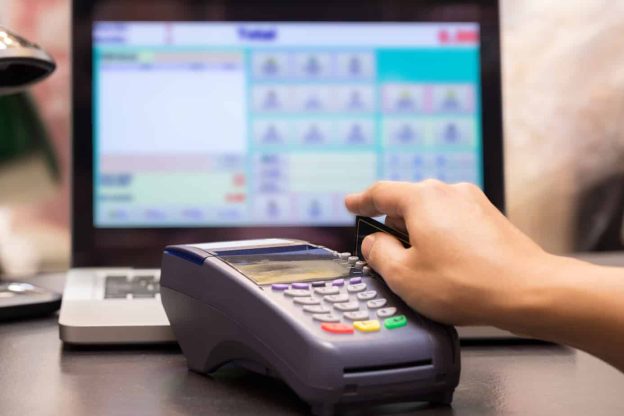
A credit card terminal is a payment gateway that doesn’t come with many features and capabilities besides its fundamental ability to process credit cards. In other words, a credit card terminal, also known as EDC Terminal (or Electronic Data Capture Terminal), enables merchants to accept debit or credit card payments.

Based on the terminal you are using; some credit card devices may come with unique features like connecting to a check reader or even processing loyalty cards or gift cards. However, most of them are simply responsible for swiping or tapping debit or credit cards to read the information encrypted in the customers’ cards.

The moment the customer’s card is swiped against the credit card terminal device, the information stored on the card is submitted to the machine for further processing. This method is considered highly cost-effective and, in fact, an eCommerce business depending heavily on its online sales cannot do without a credit card terminal.

There are numerous types of credit card terminals, including smaller, hand-held ones, which are generally easy-to-use and lightweight. Some of these devices come with a screen, a magnetic stripe reader, an EMV-chip reader, a keypad, and a signature pen. What’s more, some of them even come with a printer for payment receipts.

To put it briefly, not all credit card terminals are the same. They vary depending on the manufacturer and the brand selling it.

Therefore, finding the most suitable credit card terminal for your specific business is crucial. Besides, businesses whose sales are extended beyond one single market or location, would require a wireless terminal machine to cater to its unique payment processing needs.

What is a POS System?

POS system in a restaurant

A POS system has the same ability to process credit or debit cards but usually comes with additional features and smarter functionalities. The role of a point-of-sale system is not simply to process cards. Instead, these machines are designed to help the merchant manage his/her business by offering full integrated features and tools.

Generally, most POS systems would offer –

  • Credit card processing
  • Receipt printing
  • Cash-drawer management, specifically designed for enhancing cash sales
  • Barcode scanning
  • Inventory system to help merchants track stocks and merchandise
  • Business reporting and real-time analytics
  • Employee time clocks

Businesses must choose their POS system based on their specific preferences and requirements. In short, the advanced features of a POS system enable merchants to manage their core business areas, and not just their sales.

A good example of a POS system would be Clover Station from the payment solutions provider First Data. This system accepts cash, all card types, and prints receipts. Additionally, modern POS machines also have the capability to track employee activity, inventory, and generate real-time analytical reports for merchants.

Some point-of-sale systems are best suitable for people owning supermarkets and retail stores. These are usually the industries in which merchants don’t usually accept payments for their consumers on-the-go, mostly because POS devices cannot be transported easily.

These types of POS machines come with EMV-chip and magnetic stripe readers, keypads, etc., which are similar to terminals. Other tools and features included in a POS system are printers, larger screens, and cash drawers.

Types of Credit Card Terminals

Credit Card Terminal

The three basic kinds of credit card machines include –

  • Traditional or Conventional Terminals: Traditional terminals usually come with a small display screen, a magnetic stripe reader, and a keypad. These devices are also known as physical terminals, and they help to save both time and money.
  • Virtual Terminals: These machines are best suitable for merchants who use the phone, internet, fax, and others, to conduct their day-to-day business operations. For these merchants or business owners, traditional credit card terminals are not the right solution. Some merchant account providers, in these cases, offer business owners a virtual terminal as well as software to help manage their everyday credit card transactions.
  • Wireless Credit Card Terminals: The wireless credit card machines are more beneficial for mobile businesses as they help to increase their efficiency. Further, merchants using these terminals can accept credit cards even from temporary locations. Besides, some wireless terminals also come with inbuilt printers for faster checkouts and transactions.

The best thing about these wireless credit card terminals is that they are small, reliable, and are quite simple and uncomplicated to use. However, one downside to these otherwise amazing devices is that they can become quite expensive at times, especially for those business owners who don’t require them much. Also, one can easily lose these terminals since they are carried around more frequently.

But whatever be your credit card terminal, you can never accept card payments without one.

Credit Card Machine and POS System: What is the Right Solution for My Business?

While deciding whether to opt for a credit card machine or a POS system, the key factor to consider is which one is more advantageous and profitable for your business in the long run. Ask yourself questions like –

  • Where and how do you accept payments from your customers? Accepting credit card for your business can increase your sales by 40%
  • Which device is going to cater to your needs most efficiently and cost-effectively?
  • What are the additional features or services you would receive from your machine brand/manufacturer, and how is it going to help your business succeed?

As mentioned earlier, businesses accepting payments in one location, like a restaurant or a clothing store, would find a POS system more beneficial for them. However, companies or contractors who travel from client to client to make a sale, would prefer a credit card terminal, since they need to receive payments on-the-go.

To conclude, whichever solution you choose, make sure to check the key features it is offering. Look for some common features that almost every credit card processor or reader is providing.

Advantages of Clover POS

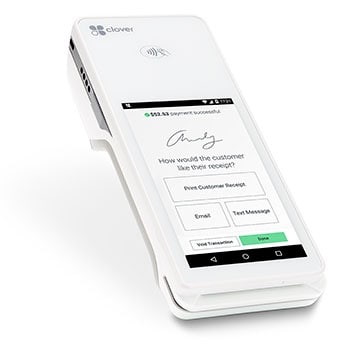
An all-in-one point of sale and payments system, the Clover Station POS makes running your business fast and easy. By accepting more payment types, offering a two printer capability, and a 14-inch display with swivel for customer signatures, the Clover® POS enables your business to focus on your customers. 

With the ability to operate via WiFi or offline, Clover POS ensures businesses can still do business under any circumstances, and with built-in encryption-enabled card readers, Clover provides an additional level of security beyond PCI and EMV standards

Great for small to medium-sized businesses, Clover is intuitive and flexible. All-in-one hardware, including the card reader makes Clover set up and use of their POS solution easy and fast for business owners. Added bonuses like the ability to print, email, and text receipts enables Clover businesses to support customers in all of their needs. With a range of apps to add as a business grows and evolves, Clover can adjust accordingly and seamlessly.

Adding Functionality

Clover offers businesses a variety of apps to increase functionality as needed. The Promos app allows you to build your customer database, allowing businesses to create a mailing list to leverage for real-time offers by way of text, email, and Facebook. The Feedback app empowers businesses to solicit customer concerns and feedback allowing businesses to build on the good and prevent public feedback for the bad. Business-specific apps like the Reward, Happy Hour, and Dining apps assist in specific business goals.

Clover as Business Partner

Clover Flex POS mobileBeyond processing credit cards, Clover POS can also help you run your business. Easy and intuitive, Clover provides functionality that allows business owners to automate payroll, employee schedules, and ordering in addition to tracking sales, creating loyalty programs, stocking inventory, and tracking returns – and beyond. 

Marrying POS and data analysis, Clover allows businesses to generate data in real-time with both a dashboard and detailed sales reports. Displaying readable charts and graphs, Clover empowers business owners to quickly and easily track metrics. 

Measuring product performance, Clover helps businesses market goods and services by identifying those that sell well and vice versa. Helping businesses discover loyal customers, Clover enables business owners to customize offers and to provide loyalty programs to repeat customers, creating a VIP strategy.

Not only can Clover help businesses schedule employees, it can also clock employees in and out. Businesses can use Clover to measure employee performance and help employers incentivize employees with top worker rewards. Customized user permissions allow employers to control employee access to Clover functions.

Clover can also help businesses track their cash flow, nipping financial issues in the bud. And beyond the scope of the business’s performance, Clover can measure area competitors and leverage local trends to increase foot traffic. 

Host Merchant Services and Clover

Host Merchant Services can customize your Clover Point of Sale System to fit your business needs. Whether your business requires a robust station including a tablet interface and printer with the option to add functionality or whether your business only needs a mobile app, turning your phone into your POS, Host Merchant Services offers these and everything in between, including the Mini POS and the handheld POS perfect for a farmers market stand or an intimate restaurant. 

Offering complimentary express service, Host Merchant Services provides free quotes. Our payment specialists can provide Clover POS pricing that fits your business.

The Clover® name and logo are trademarks owned by Clover Network, Inc., an affiliate of First Data Merchant Services LLC, and registered or used in the U.S. and many foreign countries.

What to Look For in a POS

Finding a new point of sale system for your business can be a tricky undertaking. Before you jump the gun on something that may not quite be right for your business, however, take the time to read ahead and learn just what questions you should be asking when looking for a new point-of-sale system.

How Well Does the POS System Work Between Your Retail and Online Store?

Data provided by the National Retail Federation shows that as many as 6 out of every 7 consumers will be researching a product online before deciding to buy it from a brick-and-mortar store, and it goes without saying that any business with a presence both in-store and online will have an edge. You should think of an online store as a store that never closes, and with the right point of sale, you can get your brick-and-mortar store online and available to new customers. If you will have an online and retail presence, make sure you choose a point of sale system that can work together with both channels of your business with a consolidated back-end. Most systems simply aren’t equipped to work with both online and offline sales.

Does the POS System Work Well For Your Staff?

A point of sale system is only as good as the employees who will be using it. It’s a good idea to try a system before investing in it and get input from your staff. Is the system intuitive? How much training will it require? Does it have the potential to improve productivity and customer experience? No matter what system you choose, be prepared to train employees on how to use it and its features to make sure customers aren’t kept waiting and you can benefit from features like inventory management.

Are Reporting and Analytics Offered?

Gone are the days where a merchant would be flying somewhat blind. With a good POS, you’ll be able to keep track of exactly how well your business is doing, what is selling and what isn’t, and even which employees have the best sales. You can even create and track employee schedules and manage inventory directly through the point-of-sale system.

Can the Point of Sale System Help You to Run Targeted Ad Campaigns?

Unfortunately, fewer than 1 in 10 new prospects will actually make a purchase. On the other hand, more than 6 in 10 returning customers will. Because of statistics such as these, today’s leading marketers are crafting more custom-targeted ads and focusing on what the customers actually want to know. With the right point-of-sale system, you can improve relationships between you and your customers and send more relevant communications. Depending on the features, you can use the system to determine which of your marketing campaigns have brought in customers or send win-back offers to customers who haven’t been back in a while.

Will the Growth of Your Business Be Supported by the Point of Sale System?

One of the most important things to consider with any new technology is the long-term costs and what your future needs will be. It isn’t enough to choose the simplest and cheapest option that works with your merchant services provider; you’ll soon outgrow it and regret the investment. You’ll need to make sure you purchase a scalable system that can grow along with your business.

Frequently Asked Questions

What is a POS system?

A POS (Point of Sale) system is a software and hardware combination used by businesses to complete sales transactions. It commonly consists of functionalities like tracking stock, generating sales reports, handling payments, and managing customer interactions.

What should I look for in a POS system?

When choosing a POS system, consider the following factors:u003cbru003e●       Functionality: Make sure the system aligns with your particular business requirements, including the ability to track inventory, efficiently manage employees, and seamlessly integrate with other software solutions.u003cbru003e●       User-friendliness: Seek out an intuitive interface that is simple to navigate and train your staff on.u003cbru003e●       Payment processing: Check if the system supports various payment methods, including credit cards, mobile payments, and online transactions.u003cbru003e●       Reporting capabilities: Determine if the system provides detailed sales reports, inventory insights, and analytics to help you make informed business decisions.u003cbru003e●       Scalability: Consider whether the POS system can grow with your business, accommodating additional locations, products, or users.

Should I choose a cloud-based or on-premise POS system?

When selecting a POS system, you should consider whether a cloud-based or on-premise solution is more suitable for your needs. Cloud-based systems offer the advantage of accessibility from any location with an internet connection, along with automatic updates and remote data backup. Conversely, on-premise systems provide greater control over your data and may be preferable if you have limited or unreliable internet access. To make the right choice, assess your business requirements, budget, and IT infrastructure.

What about customer support and training?

It’s crucial to assess the level of customer support and training offered by the POS system provider. Look for providers that offer reliable customer support channels, such as phone, email, or live chat. Additionally, inquire about training resources, including user guides, tutorials, and in-person or virtual training sessions, to ensure your staff can effectively use the system.

How much does a POS system typically cost?

The pricing of a POS system can differ based on various elements, such as your business size, the desired features, and the pricing structure offered by the POS provider. Some providers charge a monthly subscription fee, while others may have a one-time purchase cost. Additional costs to consider include hardware expenses, payment processing fees, and potential add-ons or integrations. It’s essential to evaluate the total cost of ownership and return on investment when choosing a POS system.u003cbru003e 

Hy-Vee Data Breach

In the middle of August 2019, convenience store and supermarket giant Hy-Vee reported a data breach incident involving its point of sale systems. Few details about the breach were initially given; however, it took about a week for cyber security researchers to take a closer look at the situation and provide more information on the matter. Before discussing some of the known details about the breach, it should be noted that it does not directly involve credit card processing insofar as clearing payments; it is isolated to point of sale equipment and its supporting data network.

Hy-Vee is a major brand in the American Midwest; the company operates convenience stores, supermarkets, snack bars, and gas stations from South Dakota to Missouri plus six other states. As can be expected from a merchant of this magnitude, many locations handle payments through a shared point of sale (POS) network. What is known thus far about the incident is that hackers targeted the POS and credit card reader terminals at the company’s gas stations, cafes, Market Grille restaurants and Wahlburger fast-food eateries. The POS and credit card processing systems at Hy-Vee supermarkets and convenience stores were not affected because they operate on a separate network. 

Gas Station Point of Sale Data Breach

According to an investigation by Brian Krebs, a respected information security researcher, the Hy-Vee breach resulted in the theft of about five million credit and debit card numbers from customers in 35 states as well as from a few countries in Europe and the Middle East. Unfortunately, these records found their way to underground cybercrime markets where they are being sold for malicious purposes. The specific market mentioned by Krebs is known as Joker’s Stash, and the name of the data dump is “Solar Energy;” the sellers are asking between $17 and $35 per record.

Since Hy-Vee is still investigating the breach, individual cardholders who may have been affected have not been notified; moreover, the locations and the specific times when the transactions were compromised have not been revealed. Another aspect of the investigation that has not been mentioned is related to the breach mechanism, but the Krebs report hinted that the POS network may have been infected with malware that intercepted data stored in the magnetic stripe of the cards. POS equipment at Hy-Vee supermarkets, convenience shops, and drugstores feature point-to-point encryption, but this does not seem to be the case in the POS equipment installed at the affected Hy-Vee gas stations, cafes and restaurants.

While the Hy-Vee data breach can result in credit and debit card cloning, the company does not think that identity theft is something that shoppers should worry about because of the type of information stolen. Nonetheless, two lessons that merchants can learn from this case include: point-to-point encryption is always preferred for POS equipment, and cybercrime insurance policies are more important than ever. It is too early to tell if the burden of liability should fall on Hy-Vee or on the vendor managing the POS network, but this is something that merchants should think about. When credit and debit card transactions are encrypted from the reader to the terminal, data breaches are significantly mitigated. Should a POS or payments processor fail to protect transactions accordingly, a good insurance policy can shield merchants from legal complaints that may arise from a data breach. 

Top 6 Retail Payment Trends in 2019

Point of Sale and Digital Payment Diversity Keeps Merchants on Their Toes

More than halfway through 2019, merchants are responding to the variety of paths consumers are choosing to pay for goods and services. From the mobile point of sale tablets retailers carry around the store to the tap-n-go options from both mobile wallets and contactless cards, consumers are adopting many options in making payments.

What must merchants do to win? Will the retail business flourish in adopting new technologies? To help answer these questions, we’ve assembled the patterns and forecasts that retailers should pay attention to in the coming months.

1. mPOS = Mobile Point of Sale

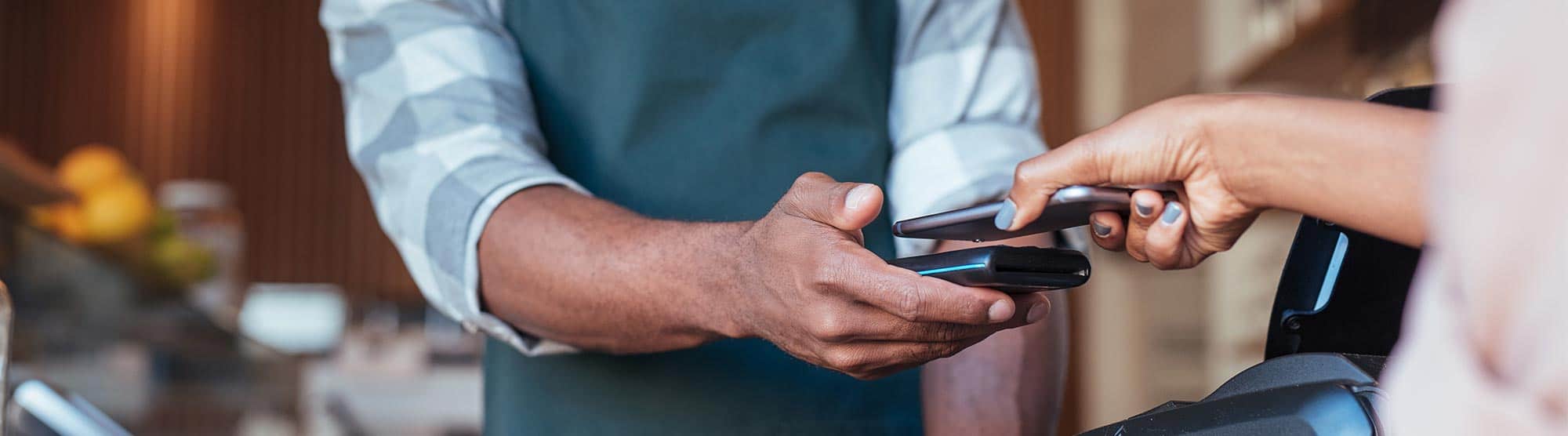
Payments made via mPOS, either a smartphone or other wireless device, are replacing the traditional point-of-sale terminal. Whether your local clothing store retailer walks up to you holding your potential purchase with a tablet to close the sale or your local coffeehouse spins a phablet toward you for your payment, mPOS is a growing trend offering merchants flexibility, as well as mobility to their paying customers. With the added functionality food trucks and other mobile businesses can have their POS in their pocket and not worry about recording the transactions in their accounting software when they get home.

2. Mobile Wallets

]In addition to big tech offering pay apps, retailers are creating their own app-based payments. Starbucks alone is the leader in all point-of-sale purchase apps, beating out big tech in the mobile wallet ambition. With loyalty programs offering points and discounts, retailers can leverage the consumer drive for convenience. Coffee drinkers like walking into their coffeehouse and picking up their cup of coffee waiting for them.

Mobile Wallet Payment Apps

3. Contactless Payments

Using NFC, near-field communication, or “contactless cards,” allow you to tap and go much like the big tech pay mobile wallet technology. An estimated 100 million contactless Visa cards will be issued in the US in 2019. Instead of taking an average of 30 seconds to insert an EMV chip, contactless only takes 15 seconds, saving 15 seconds per transaction. Many mobile wallets also have this functionality including Apple Pay and Google Pay.  The upgrade to a contactless machine is easy and most good merchant services companies are supplying them for free.

NFC (near field communication)

4. Alexa, Order Me a Pizza

Consumers now want to tell Alexa, Google, or Siri to order and pay for a pizza, handle banking transactions, or pay their bills. Security still has a long way to go with voice-activated mechanisms handling point of sale for merchants. Selling online isn’t just having an ecommerce shopping cart. Integrating into the popular search giants is gaining a ton of traction in the online/convenience shopping community. In doing so, your products can be voice ordered through smart devices. I bet your local competitor isn’t doing that!

mobile voice-activated point of sale

5. Blockchain wallets and Money Transfers

Blockchain, the record-keeping technology behind bitcoin, can track transactions securely while keeping costs in check in machine-to-machine, M2M, exchanges. Security is also the sticking point on this technology thus far. Walmart is integrating blockchain technology into their mobile wallet to make it more secure and save money in transfers, which won’t rely on a third party. While blockchain is still in its early stages for retail it is picking up momentum in the back end of many payment apps.

6. P2P = Peer-to-Peer

Younger generations are turning to mobile apps that allow them to transfer money quickly and easily to one another such as Venmo. From payment for dog sitting to paying half the dinner bill, the next wave of consumers are more comfortable with using P2P payment apps than ever before. Now, Venmo is able to be used as an NFC mobile wallet and can be used the same as Apple Pay in retail locations. Call your merchant services provider to find out how to accept NFC at no additional charge. 

While new alternatives to the point of sale provide seemingly exponential choices in paying for something, most consumers still prefer the traditional methods, namely credit, debit, and cash. Even the most tech-savvy consumer with a mobile wallet in his pocket still carries cash and a credit card.

P2P peer-to-peer mobile payment apps

How MICROS Point of Sale Systems Got Hacked

Software giant Oracle Corporation became the victim of a data breach last week when a Russian organized cybercrime group gained access to hundreds of their systems. According to security experts the group gained access through a customer support portal for companies that use the MICROS point-of-sale software from Oracle. The MICROS software payment system is an extremely widely used credit card processing system and is used in more than 330,000 cash registers throughout the world. This makes MICROS undoubtedly one of the most used POS systems worldwide, and its compromising is a cause of great concern to both consumers and businesses alike.

The extent of the breach is currently unknown as Oracle has been somewhat slow to comment on what exactly has occurred, so far only revealing that malware was found in some systems run by MICROS and both unauthorized network connections and malicious processes had to be blocked. Oracle has also informed consumers that their credit card processing system ensures that data is encrypted throughout MICROS systems and which means they are less likely to be at risk. It is unclear at this time if customer data was even seized, however MICROS is encouraging all of its customers to err on the side of caution and reset their passwords and check their credit card statements.

A source with ties to the Russian criminal underground has claimed that this same group is tied to or responsible for stealing over $1 billion from banks worldwide last year through a series of malicious data breaches and hacking of merchant services worldwide. If this claim is true, this gang certainly knows what they are doing and as a result the breach could potentially be much larger than anticipated. Oracle themselves say initially they expected the data breach to be somewhat localized to just a handful of systems but soon realized that it had reached in excess of 700 systems for merchant services.

MICROS is a massive service throughout industries ranging from hospitality to standard retail cash registers, and it’s wide span of use should be cause for concern for a great deal of businesses. While it is unlikely that this data breach was an attempt to steal personal info from consumers, given the gang’s past, it cannot be completely ruled out as a possibility. However, it is far more likely that this was a robbery, perhaps of funds or at worse accessing various credit card processing information through MICROS systems in order to steal from individuals.

Regardless of their intentions, the MICROS data breach is being touted as nothing less than a “very big deal.”  It is potentially one of the largest data breaches in recent memory and one that certainly has the potential to be the most impactful to many consumers and businesses worldwide. It just goes to show that no company can be too secure when it comes to their merchant services and credit card processing systems.

Data Breach at Wendy’s Expands to Over 1000 Locations

Data security issues at Wendy’s have now been super-sized.

Following whispers of a data breach in January, Wendy’s finally confirmed payment security issues in May, when spokesmen admitted fewer than 300 stores had been affected by malware. Now, the company admits the real number of compromised restaurants is over 1,000.

Thieves installed malware on POS card terminals to capture card numbers, cardholder names, verifications values, expiration dates, service codes and other critical data. Wendy’s stated that CVV codes were not at risk. The malware has been called “highly sophisticated in nature and extremely difficult to detect.”

The initial claim of fewer than 300 affected stores was cast into doubt by reports from card issuers that fraudulent charge volume indicated a far larger distribution throughout the chain’s 5,800 U.S. locations. Wendy’s states that the attack came in two separate waves, making it difficult to determine the total size of the data breach when it was first detected. Investigators first determined the scope as only 300 locations, only to be hit by a second, mutated strain of the malware soon thereafter.

The attack appears to have been the result of compromised security credentials used for remote access by third-party POS service companies. These companies are often hired by franchisees to manage POS systems in their restaurants, and most access them remotely. Of the 5,800 Wendy’s restaurants in the U.S., only about 630 are owned and operated by Wendy’s itself, with the remainder in the hands of local franchise owners. None of the company-owned stores have been implicated in the data breach.

In response to their discovery of the larger scale of the breach, Wendy’s has compiled a searchable database of affected locations. This database is accessible to customers on the company website.

The affected locations had not yet moved to the use of EMV chip cards. Gavin Waugh, vice president and treasurer at The Wendy’s Company, believes that the attack might not have been prevented by use of EMV. Wendy’s declined to provide a timetable for the completion of the rollout of EMV to their network of restaurants.

Gartner Group analyst Avivah Litan states that although many locations have received and installed EMV-capable terminals, not all have activated them. She acknowledged that there is a backlog of requests at the companies who certify EMV readiness for merchants ready to move to the new standard.

Industry Terms: Point of Sale

This is the latest installment in The Official Merchant Services Blog’s Knowledge Base effort. Well we want to make the payment processing industry’s terms and buzzwords clear. We want to remove any and all confusion merchants might have about how the industry works. Host Merchant Services promises: the company delivers personal service and clarity. So we’re going to take some time to explain how everything works. This ongoing series is where we define industry related terms and slowly build up a knowledge base and as we get more and more of these completed, we’ll collect them in our resource archive for quick and easy access. Today’s terms is Point of Sale (POS).

Point of Sale (POS)

The location at which a payment card transaction occurs, usually by way of a device such as a credit card terminal or cash register. The term is usually associated with retail points-of-sale, but also applies to any initial point where the customer presents payment to the merchant, such as by telephone or Internet.

The location is also sometimes referred to as Point of purchase (POP) or Checkout.

Point of Sale Terminal (POS Terminal)

A terminal at the point of sale, connected via telecommunication lines to a central computer. Authorization, recording and transmission of electronic transactions are performed through the terminal. A POS terminal manages the selling process by a salesperson accessible interface. The same system allows the creation and printing of the receipt.

The retail industry is one of the predominant users of POS terminals. A Retail Point of Sales system typically includes a computer, monitor, cash drawer, receipt printer, customer display and a barcode scanner, and the majority of retail POS systems also include a debit/credit card reader.

Restaurant POS refers to point of sale (POS) software that runs on computers, usually touch screen terminals or wireless handheld devices. Restaurant POS systems assist businesses to track transactions in real time. Typical restaurant POS software is able to print guest checks, print orders to kitchens and bars for preparation, process credit cards and other payment cards, and run reports. In addition, some systems implement wireless pagers and electronic signature capture devices.