Tag Archives: point of sale

guest takes room key card at check in desk of hotel close up 71533469

How to Handle Check-In and Checkout Processes Through Merchant Services For Hotels

Merchant services for hotels work a little differently from what you’d find in other industries. Instead of processing sales or issuing refunds, you will check in and checkout your customers. The process sounds simple, but you could potentially deal with chargebacks if you aren’t careful in your work. 

You must provide the proper dates for checking your customers in and out of a hotel when handling their credit cards. The customer’s issuing bank must receive the data necessary for ensuring an authorization for using the card. The effort ensures the customer’s protection while also keeping you covered if the customer has a later dispute.

The Consideration of Extended Authorizations

Hotels can utilize extended authorizations when collecting credit card payments. Your hotel can collect a guest’s credit card data and keep it on file. Your hotel can then authorize the card when the customer arrives. The customer will not be fully charged, as the authorization will stay on the card until your hotel finishes the sale.

The entire sale will not be fully authorized until the customer’s stay ends. It could take a few days, or it could take a couple of weeks. The extended authorization process can be risky, but you can keep it under control by running proper check-in and checkout processes.

You can use a new system to reduce the risk of chargebacks due to a card being open longer than necessary. The setup lets you list the specific time you’ll be keeping a person’s reservation open. You can charge the customer for whatever one uses at your hotel, plus you won’t risk a chargeback from billing someone for more than necessary.

Steps For Handling the Transactions

You can use these steps to manage the check-in and checkout processes when managing a sale at your hotel:

  1. You can check your guest in through a point of sale terminal you use through a merchant service provider. You’ll enter the card data and the amount you plan on charging the customer.
  2. Enter the room number the guest will use. You can produce a temporary key that works for whatever room the guest will utilize.
  3. List the number of nights that the person plans on staying in that room.
  4. You should get an invoice number for your guest’s stay. You can use this to manage the checkout effort later.
  5. The checkout process will start after the guest’s stay ends. It can start after the proper number of nights, or it can begin early if the guest has to leave on short notice. You’ll enter the guest’s invoice number here.
  6. Enter the final amount you will be charging. The total should reflect the daily room rate.
  7. Enter the tax rate you will charge. The tax rate will vary by location.
  8. Confirm the checkout time.
  9. The transaction will close, as the guest will have fully completed one’s stay at your hotel.

You can manage this process for merchant services for hotels to ensure you’re managing card transactions well. The effort should be about preventing chargebacks by listing the stay data for each guest.

Clover Point of Sale Trends for 2021

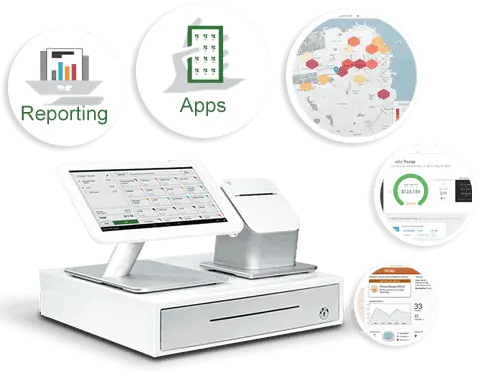
The Clover® point-of-sale or POS system is one of the most popular choices you can utilize in your business today. With Clover, you can create a fully integrated POS system that supports many apps and plug-ins. You can also handle online ordering services through Clover without paying anything extra. Clover also provides one of the most affordable services around, you could pay $70 a month at the most for a Clover station.

The best part of Clover is that it is constantly evolving. You’ll find many new things to do with your Clover POS setup as new programs and setups are developed. You can use some of these points right now when using Clover for your POS demands. These are some samples of what you can expect, as the industry is always changing with new ideas and plans in mind.

Individual Employee Monitoring

You might have many employees using the same Clover POS station, managing all your employees with separate logins, but Clover goes one step further with their performance tracker programs.

The performance tracker system lets you review each worker surrounding how many transactions one manages, how much these deals are worth, and anything else someone might achieve. You can use this to see which employees are doing well and which ones need further improvement.

Further Payroll Support

Performance tracking is essential, but so is keeping the payroll under control. You’ll need to know when your employees punch in and out, how much they are earning, and many other factors surrounding how they work. Clover will evolve to offer more payroll support, especially with the use of apps like Time Clock.

The Time Clock app from Homebase allows businesses to keep tabs on when employees are working. It also offers an employee scheduling platform where you can keep records on future schedules and send them to your employees. You can also include details on schedule changes, job postings, open shifts, and other factors. Time Clock lets you send these details to all your employees, ensuring everyone is on the same page when handling your data.

Managing Bar Tabs

Bar tabs are becoming more common these days, as people are looking to make it easier for them to pay for what they order at restaurants and bars. Clover will expand its offerings to enhance how well it can handle bar tabs.

The Bar Tab Auths app is one choice to note, for example. Bar Tab Auths let businesses pre authorize credit cards on new bar tabs. It reduces the repetitive nature of the work, and it also keeps records on regular customers and payment methods. The system ensures all data being collected works well and is easy to monitor and read.

Flexible Platforms

Clover offers a convenient station setup that lets you collect money with ease. You can use a Clover station with a touchscreen monitor, a credit card processor, a printer, and other accessories. But you can also expect mobile Clover platforms to become more popular as time moves forward.

Separate mobile payment systems may be available for your needs. You can load a Clover setup on a mobile device like a tablet or smartphone. Clover is expected to add support for multiple items in the future, so you can expect mobile transactions to become more prominent in the future.

The Clover Mini Provides More Control

Giving customers the ability to complete transactions themselves can be a necessity for success. The Clover Mini is one program that may work well for POS purposes. The Mini is a stationary countertop screen that links to a Wi-Fi network and collects payments from NFC or chip-based card readers. The system is easy to run, plus you can program a secure setup in the work as necessary. You’d have to use a suitable POS program that runs with an app from a marketplace to make it work, but it won’t be tough to run if you have the proper materials that are necessary.

Additional Integrations

You can also expect Clover to support more integrations. The Android-based setup Clover uses ensures you can load and program different add-ons and other integrations to your liking. You could use the Clover Station app store to review the thorough list of programs available for many industries. More integrations will be made available soon, so expect these programs to become more interesting and useful.

Working With QuickBooks

The QuickBooks accounting program from Intuit is already ideal for many businesses. But QuickBooks has been a standalone solution that takes a while to manage. You’d have to manually enter in data to your QuickBooks account to ensure everything is accurate. The program can collect a thorough amount of data, but it isn’t always easy to manage.

The good news is that QuickBooks will be easier to utilize if you have a Clover station. QuickBooks has a new app on Clover that was produced by Commerce Sync. The system integrates QuickBooks to your Clover POS station. The POS data will move directly to your QuickBooks account, saving you precious time managing your accounting needs. You’ll also ensure everything remains accurate, as all Clover data will immediately move to your QuickBooks reports without risking possible losses or errors.

Maintenance Is Critical

Consistent maintenance is essential for ensuring a Clover POS setup can work. Clover will expand its offerings to make it easier for people to order paper for any printers that attach to a Clover station. Abreeze Technology already has a new app ready for use in Order Paper that helps people find paper products for whatever Clover printers they utilize. For example, people can find the paper they need and order it as necessary, ensuring they’ll have the equipment they require for their work plans.

These points are useful when you’re looking to support your Clover POS setups and accounts. Clover will continue to evolve in 2021 and beyond, as it will provide more solutions that will make your POS efforts easier to manage. 

The Clover® name and logo are trademarks owned by Clover Network, Inc., an affiliate of First Data Merchant Services LLC, and registered or used in the U.S. and many foreign countries.


How MICROS Point of Sale Systems Got Hacked

Software giant Oracle Corporation became the victim of a data breach last week when a Russian organized cybercrime group gained access to hundreds of their systems. According to security experts the group gained access through a customer support portal for companies that use the MICROS point-of-sale software from Oracle. The MICROS software payment system is an extremely widely used credit card processing system and is used in more than 330,000 cash registers throughout the world. This makes MICROS undoubtedly one of the most used POS systems worldwide, and its compromising is a cause of great concern to both consumers and businesses alike.

The extent of the breach is currently unknown as Oracle has been somewhat slow to comment on what exactly has occurred, so far only revealing that malware was found in some systems run by MICROS and both unauthorized network connections and malicious processes had to be blocked. Oracle has also informed consumers that their credit card processing system ensures that data is encrypted throughout MICROS systems and which means they are less likely to be at risk. It is unclear at this time if customer data was even seized, however MICROS is encouraging all of its customers to err on the side of caution and reset their passwords and check their credit card statements.

A source with ties to the Russian criminal underground has claimed that this same group is tied to or responsible for stealing over $1 billion from banks worldwide last year through a series of malicious data breaches and hacking of merchant services worldwide. If this claim is true, this gang certainly knows what they are doing and as a result the breach could potentially be much larger than anticipated. Oracle themselves say initially they expected the data breach to be somewhat localized to just a handful of systems but soon realized that it had reached in excess of 700 systems for merchant services.

MICROS is a massive service throughout industries ranging from hospitality to standard retail cash registers, and it’s wide span of use should be cause for concern for a great deal of businesses. While it is unlikely that this data breach was an attempt to steal personal info from consumers, given the gang’s past, it cannot be completely ruled out as a possibility. However, it is far more likely that this was a robbery, perhaps of funds or at worse accessing various credit card processing information through MICROS systems in order to steal from individuals.

Regardless of their intentions, the MICROS data breach is being touted as nothing less than a “very big deal.”  It is potentially one of the largest data breaches in recent memory and one that certainly has the potential to be the most impactful to many consumers and businesses worldwide. It just goes to show that no company can be too secure when it comes to their merchant services and credit card processing systems.

Reminder: Hypercom Name Change

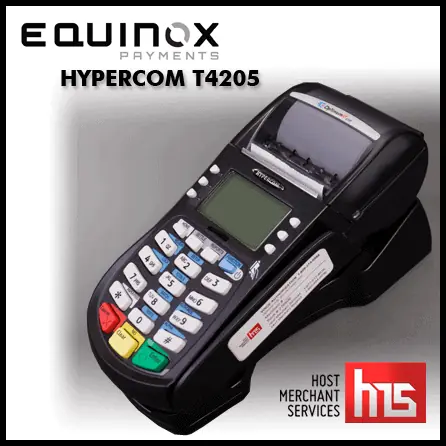
Host Merchant Services wants to take a quick moment to remind readers of The Official Merchant Services Blog, as well as its own merchants of a change that took place in 2011 with Hypercom — the company that manufactures one of the most popular brands of point of sale terminals that HMS provides.

In October, 2011 it was announced that Hypercom USA formally changed its corporate name to Equinox Payments, LLC. In addition to selling new Equinox terminals, software and services, the company continues to support the very popular Hypercom-branded products in the U.S.

Hypercom US was sold to private equity firm The Gores Group in August 2011 as part of a deal to allay competition concerns when Verifone acquired the rest of Hypercom’s global business.

Former Hypercom product names have remained unchanged, but products are now showing up in marketing materials as branded Equinox or co-branded Equinox and Hypercom. Equinox says they will maintain the Hypercom brand for an extended period of time to reinforce Equinox’s continued support of Hypercom-branded products and services. So it’s been a slow evolution, which is why HMS is offering this reminder. We wish to clear up any confusion with our merchants regarding Hypercom and Equinox due to the popularity of the T4205 Hypercom terminal among our various customers.

The Companies Involved

Equinox Payments, headquartered in Scottsdale, Arizona, is a leading payment terminal manufacturer and related secure software provider. Through its commercial offices in the United States, Latvia, Manila and Australia, and a service repair facility in Mexico, Equinox’s more than 200 employees deliver secure payment terminals, applications and services to hundreds of thousands of merchants. Equinox is a portfolio company of The Gores Group, LLC.

The Gores Group, LLC is a private equity firm focused on acquiring controlling interests in mature and growing businesses which can benefit from the firm’s operating experience and flexible capital base. The firm combines the operational expertise and detailed due diligence capabilities of a strategic buyer with the seasoned M&A team of a traditional financial buyer. The Gores Group, which was founded in 1987 by Alec E. Gores, has become a leading investor having demonstrated over time a reliable track record of creating substantial value in its portfolio companies alongside management. The firm’s current private equity fund has committed equity capital of more than $4 billion. Headquartered in Los Angeles, The Gores Group maintains offices in Boulder, CO, and London.

Industry Terms: Point of Sale

This is the latest installment in The Official Merchant Services Blog’s Knowledge Base effort. Well we want to make the payment processing industry’s terms and buzzwords clear. We want to remove any and all confusion merchants might have about how the industry works. Host Merchant Services promises: the company delivers personal service and clarity. So we’re going to take some time to explain how everything works. This ongoing series is where we define industry related terms and slowly build up a knowledge base and as we get more and more of these completed, we’ll collect them in our resource archive for quick and easy access. Today’s terms is Point of Sale (POS).

Point of Sale (POS)

The location at which a payment card transaction occurs, usually by way of a device such as a credit card terminal or cash register. The term is usually associated with retail points-of-sale, but also applies to any initial point where the customer presents payment to the merchant, such as by telephone or Internet.

The location is also sometimes referred to as Point of purchase (POP) or Checkout.

Point of Sale Terminal (POS Terminal)

A terminal at the point of sale, connected via telecommunication lines to a central computer. Authorization, recording and transmission of electronic transactions are performed through the terminal. A POS terminal manages the selling process by a salesperson accessible interface. The same system allows the creation and printing of the receipt.

The retail industry is one of the predominant users of POS terminals. A Retail Point of Sales system typically includes a computer, monitor, cash drawer, receipt printer, customer display and a barcode scanner, and the majority of retail POS systems also include a debit/credit card reader.

Restaurant POS refers to point of sale (POS) software that runs on computers, usually touch screen terminals or wireless handheld devices. Restaurant POS systems assist businesses to track transactions in real time. Typical restaurant POS software is able to print guest checks, print orders to kitchens and bars for preparation, process credit cards and other payment cards, and run reports. In addition, some systems implement wireless pagers and electronic signature capture devices.