
Tag Archives: Clover

close up of mobile phone screen with logo lettering of food delivery service grubhub on wood table with dish and cutlery 205467998

Online Orders Through New Clover and Grubhub Integration

Grubhub, the United States’ popular food payment and delivery marketplace, and Fiserv (the fintech company that has launched the Clover® payment solution app) have announced a partnership recently. They released a press statement that showed how the companies have decided to collaborate in order to make the food delivery and payment operations smoother for independent restaurant owners.

This integration is for the food retailers and restaurant owners that often struggle with food management and delivery processes. If you struggle with different point-of-sale units for food delivery, menu updates, and order processing, you should definitely give this integrated service a try. The best part is that the service is available for even those who are not using Grubhub, though it is available for a limited period only and you may have to subscribe to Grubhub to receive the ultimate benefits of this partnership. 

Grubhub and Clover – What are They Used For?

Grubhub is designed to connect over 33 million food lovers with the local restaurants, enabling them to order food from their favourite place and enjoy the meal at home. The food is then delivered to their given address, and the payment is processed through mobiles. 

Clover software app is also built for restaurant owners. The app makes it easier for restaurant owners to manage their inventory, streamline payment processing, and handle large orders efficiently. The app eliminates the need for traditional restaurant management tools, such as spreadsheets, barcode scanners, and other systems for receiving and processing orders. Not only does it allow businesses to grow, but Clover has proven to be an ultimate solution for customers who need to make credit/debit card or mobile payments for food orders. The platform reports over $180 billion in transactions every year.

Both Clover and Grubhub serve the same purpose – streamlining the restaurant management operations. Now that they have announced a partnership, it is going to be a whole lot easier for restaurants to manage all kinds of orders efficiently. In this post, we will show you how the partnership of these two leading restaurant platforms can help restaurant owners. 

The Online Ordering System of Clover makes it easier for people to monitor almost every restaurant operation – from food delivery to menu updates from a single centralized platform. The major advantage of the Clover and Grubhub integration is that businesses using Grubhub can now migrate every Grubhub function to the Clover app. This helps restaurant owners synchronize menus and make the best of the online ordering system. 

It saves the restaurant teams the time needed for entering the menus manually on different tablets. With this integration, you no longer need to have multiple tablets for managing different operations. Whether it is online ordering or food delivery, everything is executed and managed within one app. Efficient food management also means more satisfied customers.

Benefits of the Grubhub and Clover Partnership

Customers who are using Clover and are also registered with Grubhub can combine these two portals to streamline the restaurant management operations. Here are a few common benefits of this partnership.

  • Better and Efficient Order Management

Most restaurant owners used Grubhub and Clover platforms separately to receive online food orders from different customers. As a result, they had to manage multiple POS systems to process these orders. Not only was it confusing, but transferring data from one portal to another was pretty hectic and time-consuming. They had to record everything manually on each platform. 

With the integration announcement, the food retailers can have peace of mind knowing that all the orders will be received on a single system and sent directly to the kitchen printers. The major advantage of this integration is the accuracy of online order management. 

  • Real-time Syncing

Now, it is possible for restaurant owners to update the food menu on Grubhub through Clover. The real-time synchronization means your customers will know when certain food items are out of stock or when your store opens and closes. Your customers will get just about any real-time information about your restaurant. If you are not serving, you could simply toggle off the “Accept Order” button on Clover and turn it on when you are ready to execute orders.

  • Manage Delivery Options

Food ordering is not the only complex part of restaurant management. Ensuring that the food is prepared as requested and delivered to the right address on time are other important aspects of a successful restaurant management plan. The integration of Grubhub and Clover is expected to streamline food processing and delivery for restaurant owners. The integration supports the GrubHub food delivery, pickup from the restaurant, and self-delivery services.

  • Consolidated Reporting

Different management systems for restaurants means you need to access separate platforms for reports. It is important to monitor these reports for the real-time tracking of your restaurant performance. These reports also give you a better understanding of your financial growth. You no longer need to check separate reports and combine the data into one system manually. This integration allows restaurant owners to get consolidated reports on the Clover app.

How Can You Sign up for the Integrated Platforms?

Restaurant owners who have Clover but are not partnered with Gubhub can use the integration services for the first few days as part of a free trial. You can use your Clover app for signing up for the service. While the free trial is a perfect way to explore the Grubhub integration with Clover, it is available for only a small while and is only available for selected restaurants that have been maintaining the Clover POS unit for a long time. 

Conclusion

The two US leading restaurant-based software apps announced their partnership on August 25 2021, providing relief to the restaurant owners. Now, there is no need to run different software systems for order processing and delivery management. One app is sufficient to handle all kinds of restaurant operations in the most convenient and efficient manner.

The Clover® name and logo are trademarks owned by Clover Network, Inc., an affiliate of First Data Merchant Services LLC, and registered or used in the U.S. and many foreign countries.
clover on the go

Clover POS Systems Work With Many Payment Options

People who need POS system setups are finding it easier for them to accept more payment options through Clover®. Clover POS systems are prominent for how flexible they are in handling payments. These provide sensible interfaces that help people complete their transactions in moments, plus they never have to worry about inaccurate data.

Clover supports many payment options thanks to its hardware and software setups. Clover produces durable card-accepting items with customer-facing screens that help people choose what payment methods they will utilize. You’ll need this support to ensure you’ll have more control over your sales experience while satisfying whatever needs your customers may hold.

General Cards

Clover POS systems can support various payment cards. Clover produces card readers that feature screens that display payment information and details before customers can confirm their transactions. A card reader can feature a slot for chip-based cards and a swiping space for magnetic stripe-based cards.

You can program your POS system to handle credit and debit cards. You can adjust the display screen to show which card brands you can accept. Not all retailers can accept American Express cards, so having this option to edit the display screen is essential to its success.

Chip-based cards are typically more secure than stripe-based ones, as it is harder to steal data from chip cards. But Clover’s interface provides a safe body that prevents tampering and houses a secure space for cards that people cannot alter without breaking the system apart.

You can also support gift card transactions with a Clover system. Gift cards are ideal for businesses, as people who receive these cards are often more likely to spend extra money on their transactions. They might purchase more items after a while and even return well after they finish using their cards.

Contact-Free Payments

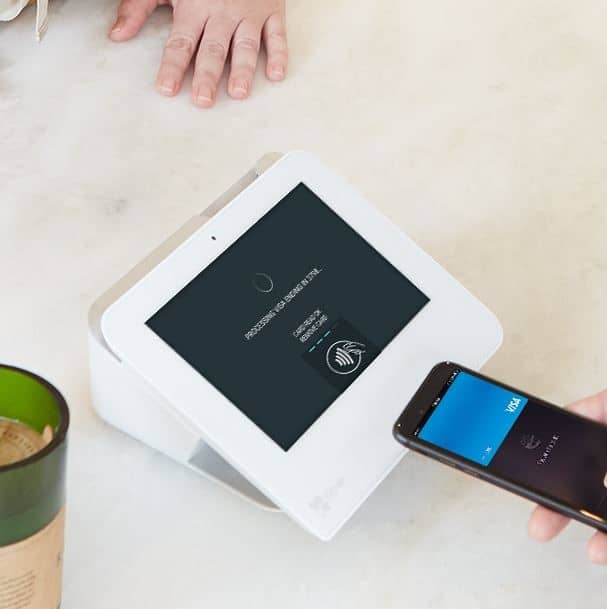
You can also use Clover POS systems to accept wireless or contact-free payments. NFC payment options like Apple Pay are very convenient. Clover makes POS setups that can collect NFC payments and other things that don’t require physical cards.

Clover produces systems that meet PCI compliance standards while handling NFC transactions. Clover will encrypt the data you collect and ensure all content goes in a secure database where nothing is stolen. The data transfer process also ensures the transaction is confirmed and secured as soon as possible.

Online Wallets

You can also accept online wallet payments through Clover. People are using online wallet systems like PayPal to complete transactions fast and without having to go into one’s credit lines. You can gather transactions from these accounts and move the money to your account in moments.

Clover can handle PayPal and other similar online transfer systems. It can use a secure online connection that encrypts all financial and wallet data while ensuring no identifying factors will be exposed to outside parties. The extra protection you utilize ensures you’ll have more control over how Clover works for your content.

Don’t Forget to Adjust Your System

You’ll need to adjust your user interface and display to ensure everyone knows what payment options you can support. Clover POS systems come with convenient interfaces and programming setups that let you control how you’re handling your funds. You can use Clover to monitor where your money is going, how people are paying for things, and anything else of interest to your business.

Clover POS systems are perfect for when you’re looking for something of value. You can use these systems to make it easier for you to accept payments that work your needs. Take note of how Clover can work for your business and how it can adapt to whatever payment methods you support when running your operation.

The Clover® name and logo are trademarks owned by Clover Network, Inc., an affiliate of First Data Merchant Services LLC, and registered or used in the U.S. and many foreign countries.
clover blog

Clover’s Point of Sale System Offers a Convenient Reporting System

Clover point of sale systems are popular for being easy to use and customizable. Clover makes various desktop and mobile POS devices that accept various payment methods. Clover’s Android-based operating system also provides support for various needs, as you can download different apps that meet your work demands.

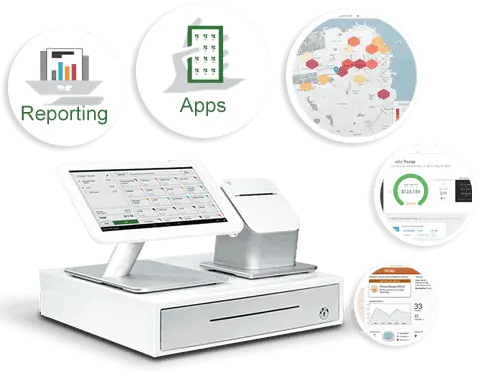
One popular part of what Clover offers entails how you can get full business reports. You can use your Clover point of sale setup to review how you’re collecting credit card payments and other transactions.

Clover provides a complete analytics system that reports on everything happening in your business. You can add details on your operations and inventory, and the Clover POS setup will keep track of sales based on what happens throughout the day.

The Clover reporting platform will help you check on many features:

  • Sales – Check on your gross sales and net sales based on expenses and other factors.
  • Item Sales – Clover will review your sales versus your reporting inventory data. You can check how many items you have left in your business through this feature.
  • Tender Types – You might conduct more business with credit cards than other payment methods. You can use the Clover POS reporting system to see which cards people use the most, plus how much they spend with them on average.
  • Employees – You can review what your POS employees are doing through your reports. You can see which employees complete the most sales and who does well with certain things.
  • Timeframe – You might sell more items at specific times of the day or week. Clover can report on when you’re selling more things, including specifics on when certain products or services are more popular.

Clover provides quick access to all these features to help you see what’s happening in your workplace. There are many other benefits to explore surrounding your Clover point of sale system:

  • You can check on sales data across multiple locations. This feature works if you operate on multiple sites.
  • You can access your reports from anywhere. Log into your Clover dashboard from any device, including a laptop computer or mobile phone, and check on how your business is running.
  • The platform lets you compare how you are doing right now versus another time. You can use this to track possible trends in your business, including whether your business is at risk of a downturn.
  • All data will remain encrypted. Clover uses strict security standards to ensure your financial data and analytics reports will not be lost for any reason.

The reporting features you can get from your Clover point of sale system will help you review what is happening in your business and what you should do to keep things running. You’ll need to know what’s happening with your business at all times, so having the Clover platform on hand will help keep you in the know about what’s happening. Check on how well a Clover system can work for your business needs and how you can use its reports today.

Clover Point of Sale Trends for 2021

The Clover® point-of-sale or POS system is one of the most popular choices you can utilize in your business today. With Clover, you can create a fully integrated POS system that supports many apps and plug-ins. You can also handle online ordering services through Clover without paying anything extra. Clover also provides one of the most affordable services around, you could pay $70 a month at the most for a Clover station.

The best part of Clover is that it is constantly evolving. You’ll find many new things to do with your Clover POS setup as new programs and setups are developed. You can use some of these points right now when using Clover for your POS demands. These are some samples of what you can expect, as the industry is always changing with new ideas and plans in mind.

Individual Employee Monitoring

You might have many employees using the same Clover POS station, managing all your employees with separate logins, but Clover goes one step further with their performance tracker programs.

The performance tracker system lets you review each worker surrounding how many transactions one manages, how much these deals are worth, and anything else someone might achieve. You can use this to see which employees are doing well and which ones need further improvement.

Further Payroll Support

Performance tracking is essential, but so is keeping the payroll under control. You’ll need to know when your employees punch in and out, how much they are earning, and many other factors surrounding how they work. Clover will evolve to offer more payroll support, especially with the use of apps like Time Clock.

The Time Clock app from Homebase allows businesses to keep tabs on when employees are working. It also offers an employee scheduling platform where you can keep records on future schedules and send them to your employees. You can also include details on schedule changes, job postings, open shifts, and other factors. Time Clock lets you send these details to all your employees, ensuring everyone is on the same page when handling your data.

Managing Bar Tabs

Bar tabs are becoming more common these days, as people are looking to make it easier for them to pay for what they order at restaurants and bars. Clover will expand its offerings to enhance how well it can handle bar tabs.

The Bar Tab Auths app is one choice to note, for example. Bar Tab Auths let businesses pre authorize credit cards on new bar tabs. It reduces the repetitive nature of the work, and it also keeps records on regular customers and payment methods. The system ensures all data being collected works well and is easy to monitor and read.

Flexible Platforms

Clover offers a convenient station setup that lets you collect money with ease. You can use a Clover station with a touchscreen monitor, a credit card processor, a printer, and other accessories. But you can also expect mobile Clover platforms to become more popular as time moves forward.

Separate mobile payment systems may be available for your needs. You can load a Clover setup on a mobile device like a tablet or smartphone. Clover is expected to add support for multiple items in the future, so you can expect mobile transactions to become more prominent in the future.

The Clover Mini Provides More Control

Giving customers the ability to complete transactions themselves can be a necessity for success. The Clover Mini is one program that may work well for POS purposes. The Mini is a stationary countertop screen that links to a Wi-Fi network and collects payments from NFC or chip-based card readers. The system is easy to run, plus you can program a secure setup in the work as necessary. You’d have to use a suitable POS program that runs with an app from a marketplace to make it work, but it won’t be tough to run if you have the proper materials that are necessary.

Additional Integrations

You can also expect Clover to support more integrations. The Android-based setup Clover uses ensures you can load and program different add-ons and other integrations to your liking. You could use the Clover Station app store to review the thorough list of programs available for many industries. More integrations will be made available soon, so expect these programs to become more interesting and useful.

Working With QuickBooks

The QuickBooks accounting program from Intuit is already ideal for many businesses. But QuickBooks has been a standalone solution that takes a while to manage. You’d have to manually enter in data to your QuickBooks account to ensure everything is accurate. The program can collect a thorough amount of data, but it isn’t always easy to manage.

The good news is that QuickBooks will be easier to utilize if you have a Clover station. QuickBooks has a new app on Clover that was produced by Commerce Sync. The system integrates QuickBooks to your Clover POS station. The POS data will move directly to your QuickBooks account, saving you precious time managing your accounting needs. You’ll also ensure everything remains accurate, as all Clover data will immediately move to your QuickBooks reports without risking possible losses or errors.

Maintenance Is Critical

Consistent maintenance is essential for ensuring a Clover POS setup can work. Clover will expand its offerings to make it easier for people to order paper for any printers that attach to a Clover station. Abreeze Technology already has a new app ready for use in Order Paper that helps people find paper products for whatever Clover printers they utilize. For example, people can find the paper they need and order it as necessary, ensuring they’ll have the equipment they require for their work plans.

These points are useful when you’re looking to support your Clover POS setups and accounts. Clover will continue to evolve in 2021 and beyond, as it will provide more solutions that will make your POS efforts easier to manage. 

The Clover® name and logo are trademarks owned by Clover Network, Inc., an affiliate of First Data Merchant Services LLC, and registered or used in the U.S. and many foreign countries.
Advantages of Clover POS

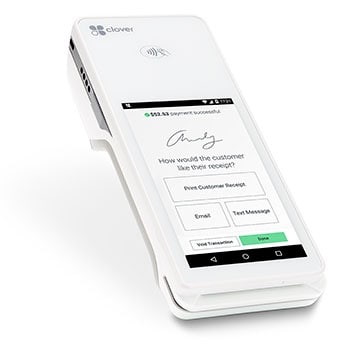
An all-in-one point of sale and payments system, the Clover Station POS makes running your business fast and easy. By accepting more payment types, offering a two printer capability, and a 14-inch display with swivel for customer signatures, the Clover® POS enables your business to focus on your customers. 

With the ability to operate via WiFi or offline, Clover POS ensures businesses can still do business under any circumstances, and with built-in encryption-enabled card readers, Clover provides an additional level of security beyond PCI and EMV standards

Great for small to medium-sized businesses, Clover is intuitive and flexible. All-in-one hardware, including the card reader makes Clover set up and use of their POS solution easy and fast for business owners. Added bonuses like the ability to print, email, and text receipts enables Clover businesses to support customers in all of their needs. With a range of apps to add as a business grows and evolves, Clover can adjust accordingly and seamlessly.

Adding Functionality

Clover offers businesses a variety of apps to increase functionality as needed. The Promos app allows you to build your customer database, allowing businesses to create a mailing list to leverage for real-time offers by way of text, email, and Facebook. The Feedback app empowers businesses to solicit customer concerns and feedback allowing businesses to build on the good and prevent public feedback for the bad. Business-specific apps like the Reward, Happy Hour, and Dining apps assist in specific business goals.

Clover as Business Partner

Clover Flex POS mobileBeyond processing credit cards, Clover POS can also help you run your business. Easy and intuitive, Clover provides functionality that allows business owners to automate payroll, employee schedules, and ordering in addition to tracking sales, creating loyalty programs, stocking inventory, and tracking returns – and beyond. 

Marrying POS and data analysis, Clover allows businesses to generate data in real-time with both a dashboard and detailed sales reports. Displaying readable charts and graphs, Clover empowers business owners to quickly and easily track metrics. 

Measuring product performance, Clover helps businesses market goods and services by identifying those that sell well and vice versa. Helping businesses discover loyal customers, Clover enables business owners to customize offers and to provide loyalty programs to repeat customers, creating a VIP strategy.

Not only can Clover help businesses schedule employees, it can also clock employees in and out. Businesses can use Clover to measure employee performance and help employers incentivize employees with top worker rewards. Customized user permissions allow employers to control employee access to Clover functions.

Clover can also help businesses track their cash flow, nipping financial issues in the bud. And beyond the scope of the business’s performance, Clover can measure area competitors and leverage local trends to increase foot traffic. 

Host Merchant Services and Clover

Host Merchant Services can customize your Clover Point of Sale System to fit your business needs. Whether your business requires a robust station including a tablet interface and printer with the option to add functionality or whether your business only needs a mobile app, turning your phone into your POS, Host Merchant Services offers these and everything in between, including the Mini POS and the handheld POS perfect for a farmers market stand or an intimate restaurant. 

Offering complimentary express service, Host Merchant Services provides free quotes. Our payment specialists can provide Clover POS pricing that fits your business.

The Clover® name and logo are trademarks owned by Clover Network, Inc., an affiliate of First Data Merchant Services LLC, and registered or used in the U.S. and many foreign countries.