



Top Mobile Point-of-Sale (POS) Systems 2025
Posted: July 25, 2022 | Updated:
Mobile point-of-sale systems have become increasingly popular thanks to a shift in customer shopping habits, an increase in contactless payments, and a general evolution of the retail industry. There are multiple options to choose from regarding mPOS systems, each with perks and particularities.
Which version works best for you largely depends on your business’s needs, but a few provide excellent features for most business types.
This article will overview some of the best mPOS systems, including their features and pricing, and offer details on what makes mPOS systems so crucial.
What Exactly Is a Mobile Point of Sale (mPOS) System?
Using a mobile point-of-sale system, you can collect payments without being tied to a single POS terminal.
POS and mPOS systems differ primarily in their hardware. Retail point-of-sale systems are typically mounted touch screen terminals, cash drawers, and receipt printers.
mPOS systems, in contrast, are portable and can be moved from one place to another, such as between tables in a large restaurant.
MPOS and POS systems use the same software, allowing you to make transactions and access additional services on various hardware devices.
What to Consider When Selecting a mPOS for Your Business
While an mPOS system handles transactions similarly to a traditional POS terminal, you must examine which options you desire and select the mPOS system that best matches your needs.
Features to Look for in a Mobile POS
An mPOS system works similarly to a traditional POS terminal, but you must carefully consider which options you want and pick the model that meets your requirements.
Make sure you can use critical functionality while on the go with some mobile POS systems. You don’t want transactions to fail or be delayed because you didn’t anticipate differences in features between your standard and your mobile POS system.
These are some essential features you should look for in a mobile POS:
- Inventory Management: mPOS applications frequently do not have automated inventory management, whereas most POS systems do. Inventory counts are crucial, especially if you are conducting mPOS transactions.
- Discount Application: Applying discounts on the fly at flash sales or pop-up events keeps things flowing smoothly without needing a calculator to figure out transaction amounts.
- Card-not-present (NPC) transactions: You can manually enter your card information on a digital device for purchases using a virtual terminal. Telephone sales are the most common type of transaction, but this feature is essential if your credit card doesn’t scan.
- Employee Accounts: Separate employee accounts allow for pinpointing the source of transaction errors. It is also possible to set account permissions to prevent employees from accessing all functions and information on your mPOS system.
Top 5 Mobile Point-of-Sale Systems
Our selection of the following systems was based on factors such as features, pricing, and advantages. Here are the top mPOS available today:
Clover Mobile POS

Image source
Clover offers a variety of mobile Android-based and purpose-built POS solutions, such as Clover Mini, Clover Flex, and Clover Go. Apart from the hardwired Clover Station, the Clover Mini is the most comprehensive Clover POS solution, and it’s just the size of an iPad Mini. Quick-service and small retail businesses use Clover’s plug-and-play POS. It can, however, also be used to run full-service restaurants, service-based businesses, and eCommerce. With a data plan, the Clover Mini’s mobility allows you to line-bust, sell on the floor, and sell outside the confines of your brick-and-mortar store. Additionally, it communicates with the rest of your Clover gear.
Regarding mobile readers that sync with your phone, Clover Go is your best option, while Clover Flex is a smart terminal similar to Poynt. However, if you do not already use Clover Station or Mini, none of these mobile POS solutions are useful as a standalone mPOS. In addition to its barcode scanner, receipt printer, and swipe/EMV/NFC reader, the Mini also has an Ethernet connector and can be used with Wi-Fi.
Clover plans are sold with a First Data (now Fiserv) merchant account and can not be configured to work with another payment processor. Clover pricing and merchant service quality are highly influenced by the Clover provider you choose. Be sure to buy from Clover directly or from a recommended Clover seller.
Features
- You can easily connect your online store to permit online ordering and contactless payments in a safer and faster way.
- Clover lets you collect one-touch tips and quickly process refunds and swaps. Digital receipts are also available for customers.
- You can accept payments via gift cards, debit cards, or credit cards. You can also accept payments via NFC and mobile wallets.
Pricing
Clover offers plans that start at $0/month for the use of the device for only payments (“Clover Payments”), with a 2.6% + $0.10 processing fee. For $9.95 per month, you can upgrade to Clover Essentials if you need basic POS services like inventory management. In addition, the $39.95 Register plan includes advanced inventory management and 2.3% in-person processing. Additionally, Cover offers counter-service and full-service restaurant plans.
Clover’s mobile POS hardware consists of the following components:
- Clover Go (99 cents)
- The Flex plan ($499 or $166 monthly for three months)
- POS Clover mini system ($749)
Pros
- Mix and match mobile devices (Clover Mini, Clover Flex, Clover Go)
- The Clover App Store has a wide variety of apps you can use to add more functionality..
- There are many Clover suppliers to choose from.
Cons
- Purchasing POS hardware can require a merchant services contract.
SwipeSimple
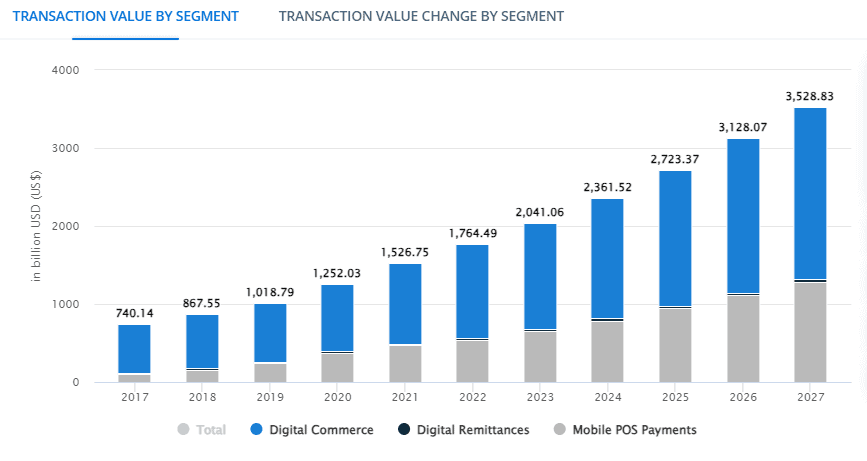
Image source
The cloud-based mobile POS system swipeSimple works on smartphones and tablets. As the name implies, it is designed for simplicity. Compared to other point-of-sale systems, it has fewer features, but it could be a low-cost way to collect payments. The app is compatible with Android and iOS devices and has a limited number of dedicated terminals.
The swipe-based system is easy to use and is frequently mentioned in positive customer reviews on Apple’s App Store and Google Play.
New users can learn how things work using the mobile app and the desktop portal using proper demo modes.
However, it can be difficult to know whether SwipeSimple is a good fit for your organization since SwipeSimple is resold by a merchant services provider, which sets the cost and terms of the contract. You must purchase it from a reseller who sets the prices and provides the system’s services and support. As a result of having to purchase from a reseller, your costs, product experience, and support quality might depend more on your reseller than SwipeSimple.
Pricing
SwipeSimple cannot be purchased directly, so it has no set price. Working with a reseller, such as a merchant service provider, would be best. Even from resellers, it’s hard to find pricing for SwipeSimple. Due to the lack of published pricing on SwipeSimple’s website, you must obtain quotations to determine your potential hardware, software, and payment processing costs.
Pros
- Try SwipeSimple in a browser or on your iOS or Android device using SwipeSimple’s demo modes. There is no need to worry about the demo involving sales pressure since you don’t disclose any information about your company.
- SwipeSimple has many merchant service providers, so you can choose one that works best for your business. With SwipeSimple’s flexibility, you can choose a compatible merchant service provider or shop around for the best price.
Cons
- The mobile app of SwipeSimple emphasizes portability but lacks many features and settings. The browser-based dashboard is the only place to see invoicing, inventory, and pricing management settings and reports beyond one-, seven-, and 30-day summaries.
- SwipeSimple’s solutions have difficulty being compared to alternatives because software, hardware, and payment processing prices are not readily available. Competitors frequently use quote-based pricing but also provide average costs or a few common bundles.
- You will need to contact your reseller for assistance with hardware, software, or account concerns, as SwipeSimple does not provide direct customer service to merchants. For better or for worse, your reseller determines the support hours and the expertise with SwipeSimple.
- Customers can contact SwipeSimple directly for assistance, but only during regular business hours, Monday through Friday (9 a.m. to 6 p.m. ET). For businesses open at night and on weekends, this could cause issues to be resolved slowly.
POS Zettle
Image source
Zettle is an excellent choice if you are looking for a mobile POS solution. Their mPOS systems include a credit card reader that accepts chip cards and debit cards. Due to its ownership by PayPal, the company has the resources of one of the world’s leading financial institutions.
Zettle can also be used to develop your online store because it is a standalone eCommerce platform. It is one of the best mobile POS options due to its web integrations and adaptability. Additionally, the company sells a variety of peripherals, including receipt printers, barcode scanners, and other items.
Like other mPOS solutions, Zettle offers inventory management capabilities and real-time sales tracking.
Features
- Add photos and create product libraries to categorize products efficiently.
- Reports can easily be exported to Excel in either .csv or .xls formats.
- Everything in Zettle is backed up automatically, including client data.
- Separate staff accounts to handle administrator rights.
Pricing
Each transaction with Zettle is charged a flat 2.29% fee plus an additional $0.09. The fee for manual card entry transactions is 3.49% plus $0.09. For enterprise clients, customized pricing is also available.
Zettle offers both ready-made store kits and standalone components. One of their mobile POS solutions is a Zettle Reader 2, which costs $79. Their initial card reader costs only $29.
Pros
- Zettle deposits funds into your account within 1-2 business days.
- Basic transaction processing with Zettle costs 2.29%.
- Zettle can easily integrate with accounting or POS software, such as Vend.
Cons
- There is no integration with CRM platforms.
- There is a monthly fee for setting up an e-commerce store.
- Customer service is unavailable on weekends or evenings.
Lightspeed Retail
Many features are included in the iPad app from Lightspeed Retail. eCommerce integration, advanced reporting, store credit, inventory management, the ability to buy in bulk and resell it individually, purchase orders, employee management, CRM, reporting, and multi-store support (some of these features are paid add-ons).
Using an iPad with Lightspeed loaded, your employees can take payments from the sales floor, display product images and descriptions, and reduce wait times. The Lightspeed app is the most advanced and expensive on our list, with a monthly fee starting at $69 (paid annually with Lightspeed Payments as your processor) for only the basic features. You can also access it by using a web browser on a desktop computer.
Pricing
All in-person payments are processed through Lightspeed Payments, which charges 2.6% plus $0.10 and 2.6% plus $0.30 for card-not-present transactions. The cost is not a good value for high-volume retailers (but you might qualify for a better deal if you process more than $250K). You can also use Lightspeed Payments with different payment processors, but if you choose another payment processor, you will be charged an additional $30 per month.
Pros
- A sophisticated point-of-sale system
- Strong eCommerce features that work on iPad and desktop
- Exceptional reporting
Cons
- The cost of software might skyrocket if you require complex functionality.
- Use of a payment processor that is not Lightspeed incurs a fee.
Shopify Point of Sale
When it comes to cost-effective mPOS solutions, Shopify POS is a great choice. Shopify offers businesses all over the world one of the top mobile POS solutions.
Over 1 million businesses use its mobile POS systems, which are one of the world’s most popular eCommerce platforms. With Shopify POS, you can seamlessly combine sales from numerous channels, even if you already have an eCommerce store built on the platform.
There are two options: Shopify POS Lite and Shopify POS Pro. In addition to POS systems, Shopify provides customized marketing solutions to increase sales.
Features
- With Shopify POS, you can easily sell using different channels if you have a Shopify store. Shopify allows you to generate QR codes for your products, manage sales, and track sales performance from a single interface.
- If you have the Shopify POS Pro plan, stocky lets you make smarter inventory management decisions through inventory tracking.
- You don’t have to worry about individual payment processors using Shopify Payments. Shopify Payments allows you to accept all types of payments, including Interac Flash, Apple Pay, Google Pay, and many more.
- In Shopify POS, you can manage your staff by granting them unique PINs and giving them access to an admin account. By doing this, you can keep track of each employee’s commissions and sales.
Pricing
You must select a Shopify plan before using Shopify’s POS system. All Shopify plans include the Shopify POS Lite, starting at just $29 per month for the most basic plan. Credit card interest rates start at 2.4% for in-person transactions.
Shopify POS Pro costs $89 per location per month in addition to the cost of your Shopify account.
A user-friendly mPOS hardware option makes Shopify one of this list’s top mobile POS systems. The company offers card readers for as low as $29.
Retail packages for the iPad are $219
Retail Stand for iPad ($149).
Pros
- You can process some transactions with restricted capability without a connection.
- Setting up is quite simple; simply connect to your Shopify account and follow the instructions. It’s as easy as clicking a few buttons.
Cons
- You must have a Shopify plan for the mPOS system to work.
3 Ways a Mobile Point of Sale System Simplifies Your Life
Small businesses benefit from mobile POS systems in numerous ways. Your company can benefit from mPOS even if it has a brick-and-mortar location. Listed below are a few creative ways you can use mobile point-of-sale systems to advance your business:
- Accept contactless payments
Mobile POS systems, in general, allow you to collect payments on a mobile device and from consumers’ cell phones and smartwatches. Contactless payments (NFC, mobile, or mobile wallets) include Apple Pay, Google Pay (previously Android Pay), and PayPal. Many POS systems also offer contactless QR code payments, which allow customers to scan a code with their phone’s camera to pay directly from their device. Offering your customers contactless payment options makes purchasing from you much easier. Customers prefer safer contactless payments, especially after COVID-19.
- Accept payments anywhere
With a mobile POS, you can accept payments from clients anywhere, from their homes to the job site, regardless of whether you work in pest control, plumbing, lawn care, or another mobile business. You can accept payment immediately instead of waiting for bills to come in. Your customers will appreciate this because handing someone their credit card is almost always more convenient than locating their checkbook or typing their credit card information into an online payment site. Additionally, you’ll have fewer late payments to chase down with on-site payments.
- Use a mobile POS for line-busting and versatile checkouts.
You can use mobile devices with traditional registers or use them instead of registers if your business is trendy. A mobile checkout system can shorten queues; for example, a café server can use a handheld device on a busy morning to make their way down the line at the counter. Providing various low-key areas in a store to check out is also possible. Self-checkout is a popular choice, and mobile hardware offers another option. With mobile POS, you always have options.
Conclusion
A mobile POS system is the best choice when a company wants sales to go beyond the cash register and wants flexibility and mobility in accepting payments. A cordless POS system is useful even if you do most or all of your business at the counter.
A POS on the go is the POS of the future because it combines convenience and portability with web-based capabilities, ease of use, and scalability. Even if you don’t need a mobile POS right now, it’s crucial to consider the future and the versatility of a tablet-based POS.