


Quicken vs. QuickBooks – Which Is Best for Small Businesses?
Posted: January 20, 2025 | Updated:
An estimated 64.4% of small businesses have deployed accounting software in their workflow. These financial management software programs help companies save money, time, and other resources by automating crucial tasks, streamlining access to data across the digital ecosystem, simplifying tax filing, and generating essential financial reports/insights. Today, we will analyze Quicken vs. QuickBooks, two of the leading software companies in the industry.
While both are excellent choices and share crucial features and functions, they cater to different users. Quicken is designed for hybrid use, for personal and family and business financial management. QuickBooks is a complete business accounting software with advanced reporting and inventory management tools.
So, which option is right for you or your business? Which one is more expensive? What are the core features of each? This article will explore all of this and more.
Source: Statista
About Quicken
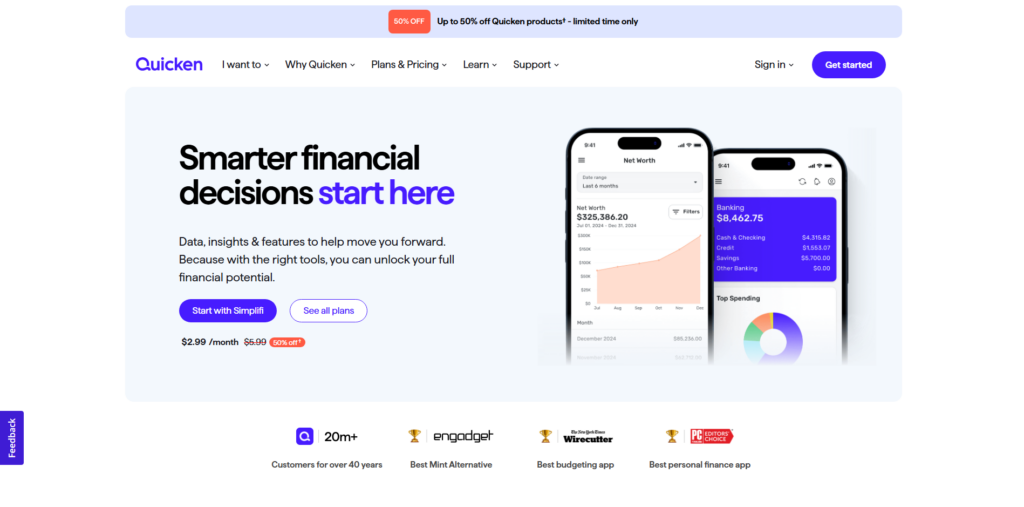
Image source
Quicken is an all-in-one financial management tool known explicitly for personal and family finance management. While the top tier offers advanced business tools, it is more or less for personal finance management.
Quicken offers features like tracking spending, creating budgets, and managing investments, providing users a holistic view of their financial health. On its dashboard, you can find summaries of account balances, recent transactions, spending categories, and budget progress – all of which allow users to understand their financial situation at a glance.
Along with its desktop application, Quicken offers an online web-based solution. The online platform lets you view and edit their financial data, including account transactions, spending, budgets, bill and income reminders, and investments. However, to use this online, users must sync their data with Quicken Cloud. After this step, all your data becomes up-to-date across all the platforms. It’s important to note that while Quicken on the Web offers many key features, it is designed to complement the desktop application and may not include all functionalities available on the desktop version.
About QuickBooks
Unlike Quicken, QuickBooks is an accounting software that is more inclined towards small- and medium-sized businesses. This software, developed by Intuit and introduced in 1992, offers both on-premise and cloud-based solutions.
With QuickBooks, users can handle various accounting tasks such as invoicing, bill payment, payroll processing, and inventory management. The software integrates seamlessly with multiple third-party applications, enhancing its functionality to cater to diverse business needs.
One of the key offerings is QuickBooks Online, a cloud-based version that allows businesses to access their financial data anytime, anywhere, promoting collaboration among team members and accountants. This platform supports features like automatic bank transaction imports, real-time financial reporting, and customizable invoices. Additionally, QuickBooks Online offers scalability with various subscription tiers, accommodating the evolving requirements of growing businesses.
Quicken vs. QuickBooks: Key Features
QuickBooks Online is ideal for businesses that require robust accounting tools. In contrast, Quicken is better suited for personal finance management or tiny businesses with basic needs, such as freelancers or those with rental properties. Here’s a look at the key features of each:
Quicken Features
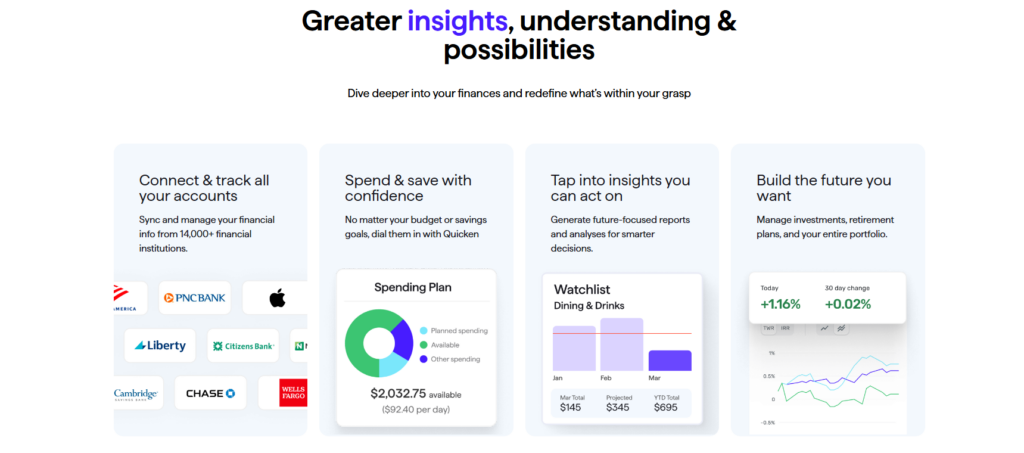
Quicken is a comprehensive personal finance management tool offering various features to help individuals and small business owners manage their finances effectively. Below is an overview of its key features:
For Personal Finance Management
- Comprehensive Financial Overview: Quicken allows users to consolidate and monitor all their financial accounts, including bank balances and transactions, within a single dashboard. This unified view simplifies financial tracking and planning.
- Budgeting Tools: Users can create and manage personalized budgets to track spending and identify trends, aiding in better financial decision-making. Quicken’s budgeting tools help users stay on top of their expenses and savings goals.
- Investment Tracking: Quicken enables users to monitor investment performance, including portfolios and retirement plans, to stay informed about their financial growth.
Business Features (Home, Freelance, and Consultancy)
- Separation of Finances: Quicken helps users keep personal and business finances distinct, simplifying financial management and reporting. This separation is crucial for accurate accounting and tax preparation.
- Invoicing: Users can generate customized invoices with their logo and payment links and set up reminders for unpaid invoices to ensure timely payments. This feature streamlines the billing process and improves cash flow management.
- Income and Expense Tracking: Quicken allows users to monitor business income and expenses and generate cash flow reports and profit/loss projections to assess business health. These insights help in making informed business decisions.
- Tax Management: Quicken simplifies tax preparation with custom tax reports, helping users stay organized during tax season. By categorizing transactions appropriately, users can generate reports that align with tax forms, reducing the hassle of tax filing.
Rental Property Management
- Rent Payment Management: Quicken enables users to send rent reminders with payment links, track rental income, and monitor lease terms, rental rates, and tenant deposits.
- Property Reporting: Users can generate detailed reports on their property portfolio to stay informed about their rental business performance. These reports provide insights into rental properties’ income, expenses, and profitability.
QuickBooks Features
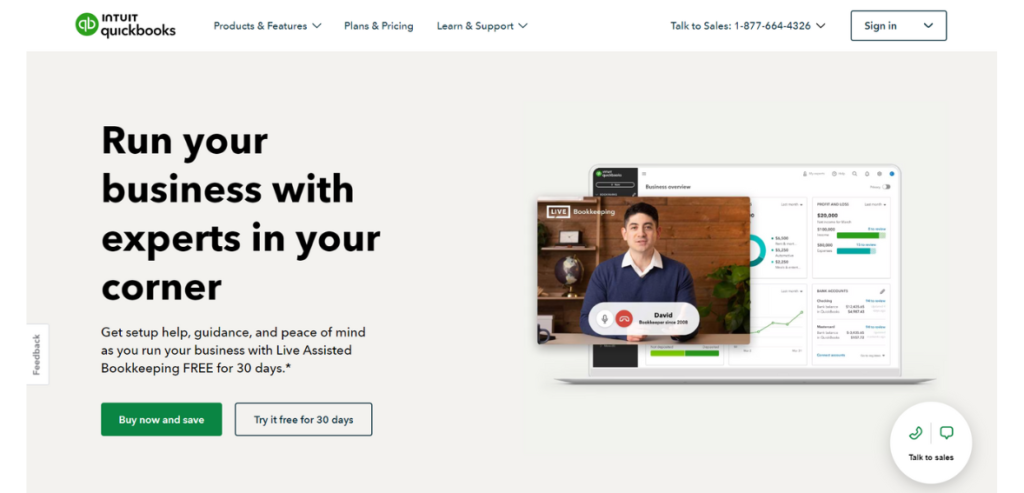
Image source
Below is an overview of its key features:
- Income and Expense Tracking: QuickBooks lets users connect their bank and credit card accounts, enabling automatic import and categorization of transactions. This real-time integration provides up-to-date insights into your financial status, simplifying the tracking of income and expenses.
- Invoicing: Users can create and customize professional invoices, incorporating their branding elements. QuickBooks supports the setup of recurring invoices and facilitates online payments, streamlining the accounts receivable process and improving cash flow management.
- Expense Management: The QuickBooks mobile app lets users capture and organize receipts. By photographing receipts, users can attach them to corresponding expenses within the system, ensuring accurate record-keeping and simplifying expense tracking.
- Financial Reporting: QuickBooks offers a variety of economic reports, including profit and loss statements and balance sheets. These reports provide valuable insights into your business’s financial health, aiding in informed decision-making and strategic planning.
- Sales Tax Management: The software automates sales tax calculations based on location, product type, and customer details. This automation ensures compliance with tax regulations and reduces the risk of errors in tax reporting.
- Inventory Management: QuickBooks helps businesses track inventory levels, monitor costs, and manage stock efficiently. By maintaining accurate inventory records, businesses can meet customer demand and minimize holding costs.
- Project Profitability Tracking: Users can organize each project’s income, expenses, and labor costs within QuickBooks. This feature allows for evaluating project profitability and supports informed decision-making regarding resource allocation.
- Payroll Integration: QuickBooks integrates with payroll services to manage employee salaries, taxes, and filings directly within the platform. This integration simplifies payroll processing and ensures compliance with tax regulations.
- Time Tracking: The software enables recording employee and contractor hours, linking billable time to customer invoices for accurate billing. This feature ensures that all billable hours are accounted for and invoiced appropriately.
- Multi-User Access: QuickBooks supports collaboration by allowing multiple users to access the system simultaneously. Administrators can grant customizable permissions to each user, ensuring data security and appropriate access levels.
Quicken vs. QuickBooks: Integration Options
When comparing Quicken and QuickBooks regarding integrations, QuickBooks offers a significantly broader range of options, enhancing its functionality across various business operations.
While Quicken offers essential integrations primarily focused on personal finance and basic property management, QuickBooks provides a vast ecosystem of integrations catering to diverse business needs, making it more scalable than Quicken.
Quicken Integrations
Quicken is primarily designed for personal finance management and offers limited integration capabilities. One of its main features is connectivity with financial institutions. Quicken supports thousands of banks and credit unions through Direct Connect, Web Connect, or Express Web Connect. However, the availability of these connection methods varies by institution and account type. Quicken’s official support page provides comprehensive guidance for users seeking detailed information about supported banks.
Regarding document management, Quicken enables users to attach documents to individual transactions, enhancing record-keeping capabilities. While it does not directly integrate with external document management systems, users can manually attach files stored locally on their devices.
For property management, Quicken includes built-in tools to help track rental properties. These features allow users to efficiently manage tenants, rental rates, and lease terms. However, these tools operate independently of third-party integrations, relying solely on Quicken’s internal functionalities.
QuickBooks Integrations
QuickBooks offers an extensive range of integrations that enhance its functionality across various business operations. In its marketplace, it provides over 750 apps. For payment processing, integrations like Bill.com automate accounts payable and receivable, streamlining bill payments and invoicing. Melio also supports fast and secure bill payments through bank transfers, credit cards, or debit cards.
In payroll and HR management, QuickBooks integrates with Gusto, a platform providing comprehensive payroll processing and HR services. For e-commerce, integrations with platforms like Shopify allow seamless sales data synchronization, aiding in inventory and order management. At the same time, Amazon Business Purchases simplifies expense tracking by syncing purchase data.
QuickBooks also supports customer relationship management (CRM) through tools like Method CRM, which syncs customer data for better management and enhanced workflows. Time tracking is made efficient with QuickBooks Time, enabling businesses to track employee hours and integrate the data directly into payroll processing.
Inventory management is braced by integrations such as Fishbowl Inventory, which offers advanced features tailored to manufacturing and warehouse operations. Additionally, QuickBooks supports marketing efforts through Mailchimp, a tool that helps manage email marketing campaigns by integrating customer data for targeted outreach. These integrations collectively make QuickBooks a versatile solution for diverse business needs.
Quicken vs. QuickBooks: Mobile App
When evaluating the mobile applications of Quicken and QuickBooks Online, it’s essential to understand the functionalities each offers to determine which aligns best with your financial management needs.
Quicken Mobile App
The Quicken Mobile App is a companion tool for the desktop versions of Quicken on Windows and Mac, available for both iOS and Android devices. The app allows users to:
- View Account Information: Access account balances and recent transactions.
- Add and Edit Transactions: Enter new transactions and modify existing ones, including assigning categories, tags, and notes.
- Track Spending and Budgets: Monitor spending habits and view budget progress.
- Manage Investments: Review investment accounts and performance.
However, the app is designed to complement, not replace, the desktop application. Certain features, such as adding or deleting accounts, categories, tags, or budgets, are only available on the desktop. Similarly, generating detailed reports is exclusive to the desktop. To maintain data consistency across platforms, users are advised to synchronize their data between the desktop and mobile applications regularly.
QuickBooks Mobile App
The QuickBooks Mobile App, available for iOS and Android devices, provides a robust set of features designed to support comprehensive business management on the go. It enables efficient customer and vendor management, allowing users to create and manage profiles, import contacts, and view locations on a map.
For transaction processing, the app allows users to generate estimates, invoices, sales receipts, and record payments. It also supports creating expenses with receipt photo attachments, splitting expenses across categories or assigning them to specific customers, and entering hostile prices or rates when necessary.
The app integrates seamlessly with banking, enabling users to reconcile transactions from connected accounts, access bank ,and credit card feeds with on-demand refresh capabilities, and modify multiple bank feed transactions simultaneously.
Reporting features include running essential financial reports directly from the app, such as Profit & Loss statements and Balance Sheets. Additionally, users can add notes and attachments to transactions and profiles, manage tax rates, and take advantage of multi-currency support for international transactions. The app also tracks mileage automatically to help maximize tax deductions.
While the QuickBooks Online Mobile App replicates many features of its web counterpart, some advanced functionalities may require a web browser. Nevertheless, the app ensures seamless data synchronization across devices, making it a powerful tool for managing business operations anytime, anywhere.
Quicken vs. QuickBooks: Comparing Pricing
Quicken offers a more cost-effective solution than QuickBooks, with its yearly subscription cost roughly equivalent to what QuickBooks charges monthly. While Quicken is more affordable, it offers fewer features, less customization, and generally less functionality overall.
Both can manage basic accounting tasks for small businesses. However, QuickBooks is often the preferred choice for business owners in need of more comprehensive tools. In contrast, Quicken is an economical choice for small businesses that do not require inventory management capabilities.
Let’s look at it in detail:
Pricing of Quicken
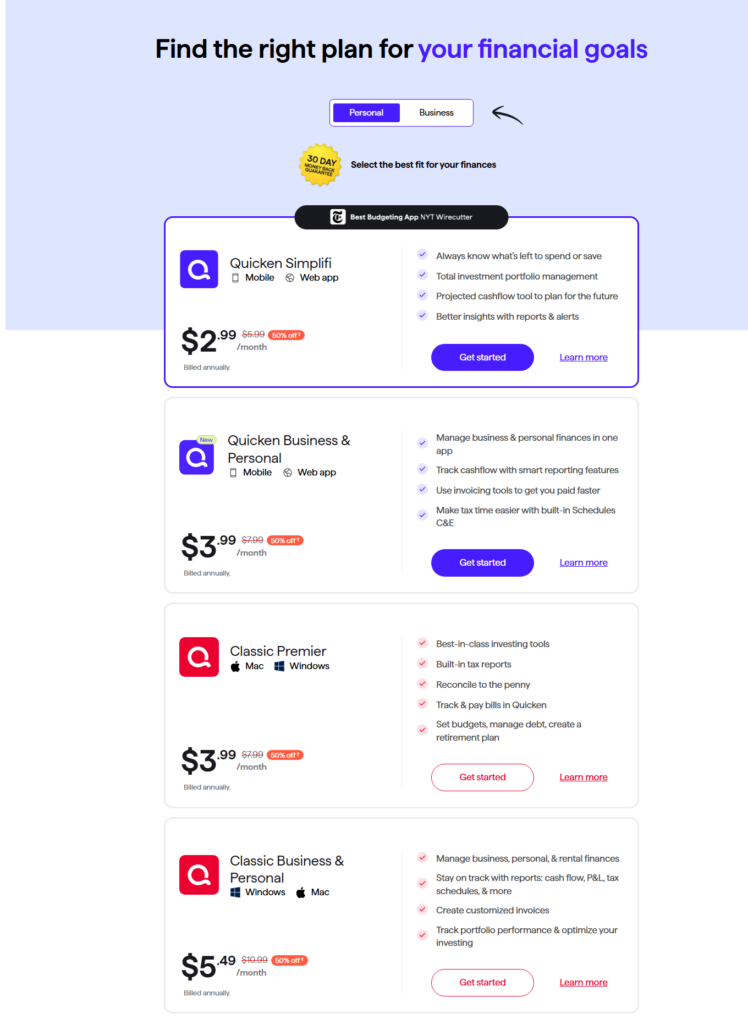
Quicken offers a range of subscription plans tailored to meet diverse financial management needs. With Quicken, you don’t get any free trial but a 30-day money-back guarantee. Below is a detailed overview of each plan, including their features and pricing (based on an annual basis):
1 Quicken Simplifi
Quicken Simplifi is a financial management tool available as a web and mobile app, designed to help users take control of their finances. Priced at $2.99 per month, it offers a range of features to streamline financial tracking and planning.
Users can consolidate all their bank accounts, loans, credit cards, and investments into a single dashboard for easy monitoring. It enables tracking progress toward both short- and long-term savings goals while providing insights into spending habits across various categories. Additionally, Simplifi creates a personalized budget that updates automatically as you spend, helping you optimize both your savings and expenses effectively.
2. Quicken Classic Deluxe
Quicken Classic Deluxe is a comprehensive financial management tool available as a desktop app for Mac and Windows, priced at $4.99 per month. It offers robust features to help users manage their finances effectively.
Users can create strategies to manage and reduce debt, develop secure retirement plans, and simplify tax preparation using built-in tax reporting tools. Additionally, it allows for multiple customizable budgets, enabling tailored financial planning to suit individual needs.
3. Quicken Classic Premier
Quicken Classic Premier is a powerful financial management tool for Windows and Mac desktop users, priced at $3.99 monthly. It includes all the features of the Deluxe version, such as customizable budgets, debt management tools, and retirement planning, while adding even more advanced capabilities.
Premier users gain access to best-in-class investing tools to manage their portfolios effectively and utilize built-in tax reporting features for simplified tax preparation. The platform allows users to reconcile accounts down to the penny and track and pay bills directly within Quicken, offering a comprehensive solution for managing all aspects of personal finance.
4. Quicken Classic Business & Personal
Quicken Classic Business & Personal is a versatile financial management solution available as a desktop app for Mac and Windows, priced at $5.49 per month. It is designed to seamlessly integrate the management of business, rental, and personal finances into one platform.
The plan offers detailed tracking to optimize tax preparation, helping users stay organized and efficient. Additionally, it provides robust document organization features and the ability to generate comprehensive financial reports, including cash flow, profit & loss, tax schedules, and more, making it an ideal choice for individuals managing multiple financial responsibilities.
Pricing of QuickBooks
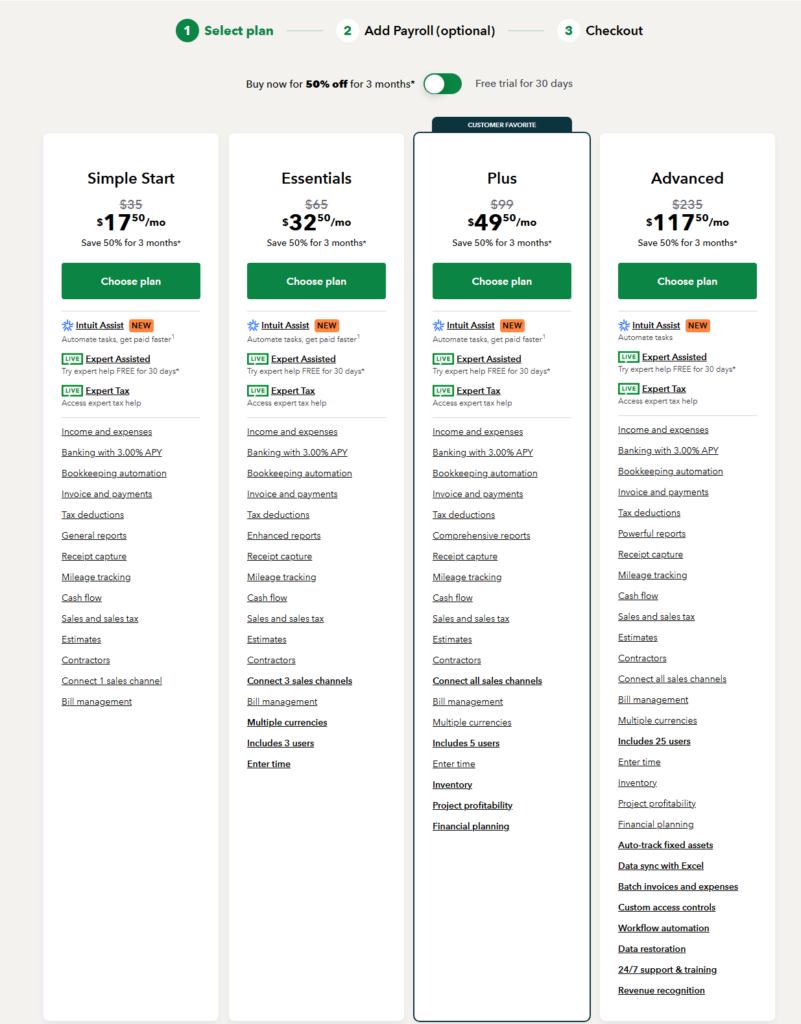
QuickBooks offers a range of subscription plans tailored to meet the diverse needs of businesses, from sole proprietors to growing enterprises. And unlike Quicken, QuickBooks offers a 30-day free trial if you want to test its capabilities. Below is an overview of each plan, including pricing, user allowances, and key features:
1. Simple Start Plan
The Simple Start plan is priced at $35 per month, with a special discounted rate of $17.50 for the first three months. This plan is designed for a single user and includes various features to streamline basic accounting tasks.
Key features include:
- Automated Income and Expense Tracking,
- Unlimited Estimates,
- Invoices and Sales Receipts
- Customizable Invoice Templates.
It also offers automated sales tax calculations, expense categorization with receipt capture, and access to a mobile app. Additionally, users can generate over 20 business reports to stay on top of their finances. This plan best suits small business owners and startups with fundamental accounting needs.
2. Essentials Plan
The Essentials plan is priced at $65 per month, with a discounted rate of $32.50 for the first three months. Designed for up to three users, this plan includes all the features of the Simple Start plan, along with additional tools to enhance billing and financial management.
It offers bill management and vendor payments, time tracking for employees and contractors, and an audit log to monitor user activities. The plan also supports multiple currency transactions and provides access to over 40 detailed financial reports. This plan is ideal for small businesses that need multi-user access and more advanced billing features.
3. Plus Plan
The Plus plan is $99 per month, with a discounted rate of $49.50 for the first three months. Designed for up to five users, this plan includes all the features of the Essentials plan, along with additional tools tailored for growing businesses.
Key features include:
- Inventory Tracking with FIFO Valuation
- Project Profitability Tracking
- Create and Manage Purchase Orders.
The plan also provides budgeting and financial planning tools and access to over 65 comprehensive business reports. This plan best suits small to medium-sized businesses requiring inventory management and project tracking capabilities.
4. Advanced Plan
The Advanced plan is priced at $235 per month, with a discounted rate of $117.50 for the first three months. Supporting up to 25 users, this plan builds on the features of the Plus plan with additional tools designed for growing businesses nearing mid-market size.
It includes advanced reporting and analytics powered by Fathom integration, Priority Circle support with a dedicated account manager, and custom user permissions for enhanced security. Other features include batch importing and processing, unlimited classes and location tracking, and up to 10 custom fields for detailed monitoring. This plan is ideal for businesses that require robust tracking and sophisticated reporting capabilities.
QuickBooks also offers payroll services that can be integrated with your accounting plan, providing options to meet various business needs. The Payroll Core plan is priced at $50 per month, with a discounted rate of $25 for the first three months, plus $6 per monthly employee. It includes full-service payroll with automated tax calculations and filings, Auto Payroll for salaried employees, next-day direct deposit, 1099 e-file and pay, and an employee portal for accessing pay stubs and W-2s. This plan is ideal for small teams needing essential payroll services.
The Payroll Premium plan costs $80 per month, discounted to $40 per month for the first three months, plus $8 per employee. In addition to all Payroll Core features, it offers same-day direct deposit, time tracking integration, access to an HR support center, and an expert setup review. This plan suits businesses requiring integrated time tracking and enhanced payroll functionality.
For maximum support, the Payroll Elite plan is $130 per month, with a discounted rate of $65 for the first three months, plus $10 per employee per month. It includes all Payroll Premium features, tax penalty protection up to $25,000, a personal HR advisor, expert setup assistance, and 24/7 premium support. This comprehensive plan is best for businesses seeking robust payroll services with extensive backing and protection.
Which Option Offers Better Security Quicken or QuickBooks?
Choosing the right accounting software involves prioritizing the security and privacy of your financial data. While both Quicken and QuickBooks are designed with strong security measures, their approaches to protecting your information differ significantly.
Quicken is primarily desktop software with 256-bit encryption to secure your data during transmission. Since your data is stored locally on your device, you can protect it. This setup means managing regular backups and safeguarding your hardware from failures or breaches. To help you, Quicken provides features like password protection for data files and a Password Vault for securely storing credentials.
On the other hand, QuickBooks Online is a cloud-based platform that prioritizes advanced, automated security. It uses 128-bit SSL encryption for data transmission and stores your information on highly secure servers equipped with 24/7 surveillance and alarms. Automatic data backups are a built-in feature, minimizing the risk of losing important information. QuickBooks Online also includes multi-factor authentication (MFA), offering an additional layer of defense against unauthorized access.
In short, Quicken is ideal for those who prefer local storage and are comfortable managing their data security and backups. Meanwhile, QuickBooks Online suits users who value remote access, automatic backups, and advanced security features the service provider handles. Both options cater to different needs, so your choice will depend on which security model aligns better with your priorities.
Quicken vs. QuickBooks: Customer Support Options
QuickBooks provides better customer support overall, with round-the-clock availability for its Advanced users and more extensive resources like training courses and a blog.
Quicken offers reliable support through phone, chat, and a community forum, but its availability is limited to specific hours, and resources are less comprehensive. For businesses needing frequent or advanced support, QuickBooks is the superior choice.
Here’s a look at it:
Customer Support Offered by Quicken
Quicken provides a range of customer support options to help users with their financial software needs. The Online Help Portal is a comprehensive resource where users can search for answers, explore specific topics, or access instructional videos through Quicken Video University. Additionally, the Quicken Community offers a platform to connect with expert users anytime.
Quicken’s Live Support team is available via phone at (650) 250-1900 for direct assistance. Phone support operates from 5:00 am to 5:00 pm Pacific Time, Monday through Friday, and is exclusively for customers using currently supported products. Alternatively, users can access Live Chat support online, available daily from 5:00 am to 5:00 pm Pacific Time. To start a chat session, visit the Quicken Support Homepage and select the “Chat Now” option.
The Community Forum is another helpful avenue where users can ask questions and receive answers from other Quicken users and experts. Navigating to Help > Quicken Community can access this through the Quicken application.
Customer Support Offered by QuickBooks
QuickBooks offers a variety of customer support options to assist business owners in managing their accounting needs effectively. The Online Help Portal is a comprehensive resource, providing articles, video tutorials, free training courses, and the QuickBooks Blog, which offers valuable insights and updates. Users can find detailed information on account setup, transaction management, report generation, and more.
Phone support is available for personalized assistance. QuickBooks Online users with Plus, Essentials, or Simple Start subscriptions can access phone support Monday through Friday from 6:00 AM to 6:00 PM Pacific Time and on Saturdays from 6:00 AM to 3:00 PM Pacific Time. Users with QuickBooks Online Advanced subscriptions have round-the-clock support available every day. To request a callback, users must sign in to their QuickBooks Online account, click the Help icon, and follow the prompts.
Live chat support is available for those who prefer real-time online communication. Users can access this feature by signing in to their QuickBooks Online account, selecting the Help icon, and choosing the chat option. This allows for quick and convenient assistance without making a phone call.
The Community Forum is another valuable resource where users can ask questions and exchange knowledge with other QuickBooks users and experts. It’s an excellent platform for finding answers to common questions and learning best practices from experienced members of the QuickBooks community.
Support hours vary depending on the subscription plan. For users of Plus, Essentials, and Simple Start, support is available Monday through Friday from 6:00 AM to 6:00 PM PT and on Saturdays from 6:00 AM to 3:00 PM PT. For QuickBooks Online Advanced users, support is available anytime, on any day.
Conclusion
Quicken and QuickBooks are powerful tools catering to different financial management needs, making their choice highly dependent on the user’s specific requirements.
Quicken shines in personal finance management, offering tools that integrate seamlessly with personal budgeting, investment tracking, and even essential business or rental property management. Its affordability and desktop-focused model make it ideal for individuals, freelancers, or small businesses with straightforward financial needs.
On the other hand, QuickBooks is a more robust business accounting solution. With advanced tools for invoicing, payroll, inventory management, project profitability tracking, and comprehensive financial reporting, it caters to growing businesses, larger teams, and those requiring cloud-based accessibility. While it may come at a higher cost, its scalability, extensive integrations, and automation capabilities justify the investment for businesses looking for a versatile and powerful accounting platform.
Ultimately, choosing between the two depends on the nature and scale of your financial operations. If you’re managing personal finances or running a small business with limited complexity, Quicken could be the right fit. However, QuickBooks is preferred if your business demands more advanced features, collaboration, and scalability.