



Valor VL100 Quick Reference Guide
Posted: January 30, 2023 | Updated:

How To Run a Transaction on a Valor VL100
How To Run a Credit Sale on a Valor VL100
- Enter the transaction amount and press OK.
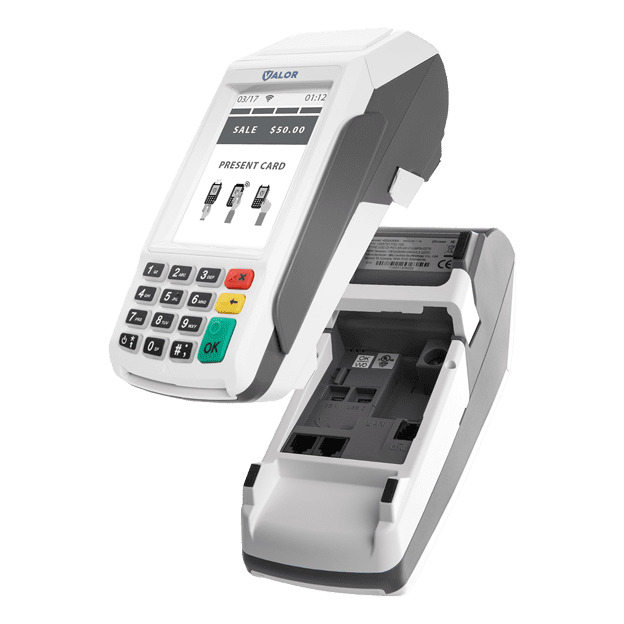
- Swipe/Insert/Tap card on Present Card screen or start typing the card number for manual entry.
- Sign and Tip of prompted.
- Select receipt delivery method.
How To Run a Debit Sale on a Valor VL100
- Tap Credit until Debit is displayed.
- Enter the transaction amount and press OK.
- Swipe/Insert/Tap card on Present Card screen or start typing card number for manual entry.
- Enter PIN number and Tip if prompted.
- Follow prompts until receipt prompt – select receipt delivery method.
How To Run a Refund on a Valor VL100
How To Run a Credit Refund on a Valor VL100
- Tap Sale until Refund is displayed. Enter the Refund amount and press OK.
- Enter password if prompted.
- Swipe/Insert/Tap the card on the Present Card screen or start typing card number for manual entry.
- Select the Receipt delivery method.
- Tap Sale until Refund is displayed. Enter the Refund amount and press OK.
- Enter password if prompted.
- Swipe/Insert/Tap the card on the Present Card screen or start typing card number for manual entry.
- Select the Receipt delivery method.
How To Void a Transaction on a Valor VL100
How To Run a Credit Void on a Valor VL100
- Tap Sale until Void is displayed. Press OK and enter the password.
- Select Transaction Number or Card Number.
- If Transaction Number, enter transaction number, If Card Number, enter last 4 digits of card.
- Transaction will appear on screen. Press OK to void the transaction.
- Select receipt delivery method.
How To Settle Your Current Batch on a Valor VL100
- Select Number 2
- On the favorites menu you will be prompted to Settle the current batch that is open.
Features Of Valor VL100
- Paperless Receipt/Signature Option:
Post-transaction, offers your customers the flexibility to receive their receipts digitally—via SMS text, email, or a paperless option. This not only reduces your paper costs significantly but also maintains a digital record of all sales receipts complete with your customer’s signature, a valuable asset in preventing chargebacks.
- Contactless Payment:
Prioritize safety for both merchants and customers with the acceptance of contactless payments. The Valor VL100 terminal comes equipped with a contactless payment option, enabling seamless processing without physical contact. It supports popular eWallet payments such as Samsung Pay, Apple Pay, Android Pay, and Google Pay.
- Full Transaction Details:
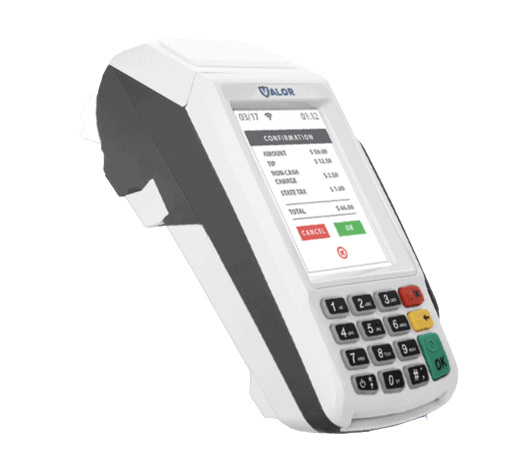
Stand out from the competition by providing a comprehensive view of transaction details. Unlike other terminals with limited display space, Valor ensures that your customers see the entire transaction information, including tip, total sale, tax lines, and Non-Cash Charge. Avoid confusion by presenting clear, itemized details, setting Valor apart from competitors like PAX, which may leave customers unaware of additional fees. Customize the display to add personalized information for an enhanced customer experience.
- Seamless Auto Connect
In the event of a standard connection failure, the VL100 terminal effortlessly transitions between ethernet, Wi-Fi, and 4G connections as part of its failback procedure. Whether you’re navigating a bustling office environment or on the go, the VL100 ensures uninterrupted service by smoothly switching between ethernet and Wi-Fi connections while actively seeking a signal. Stay connected with confidence, courtesy of Valor’s intelligent and reliable failback procedure.